
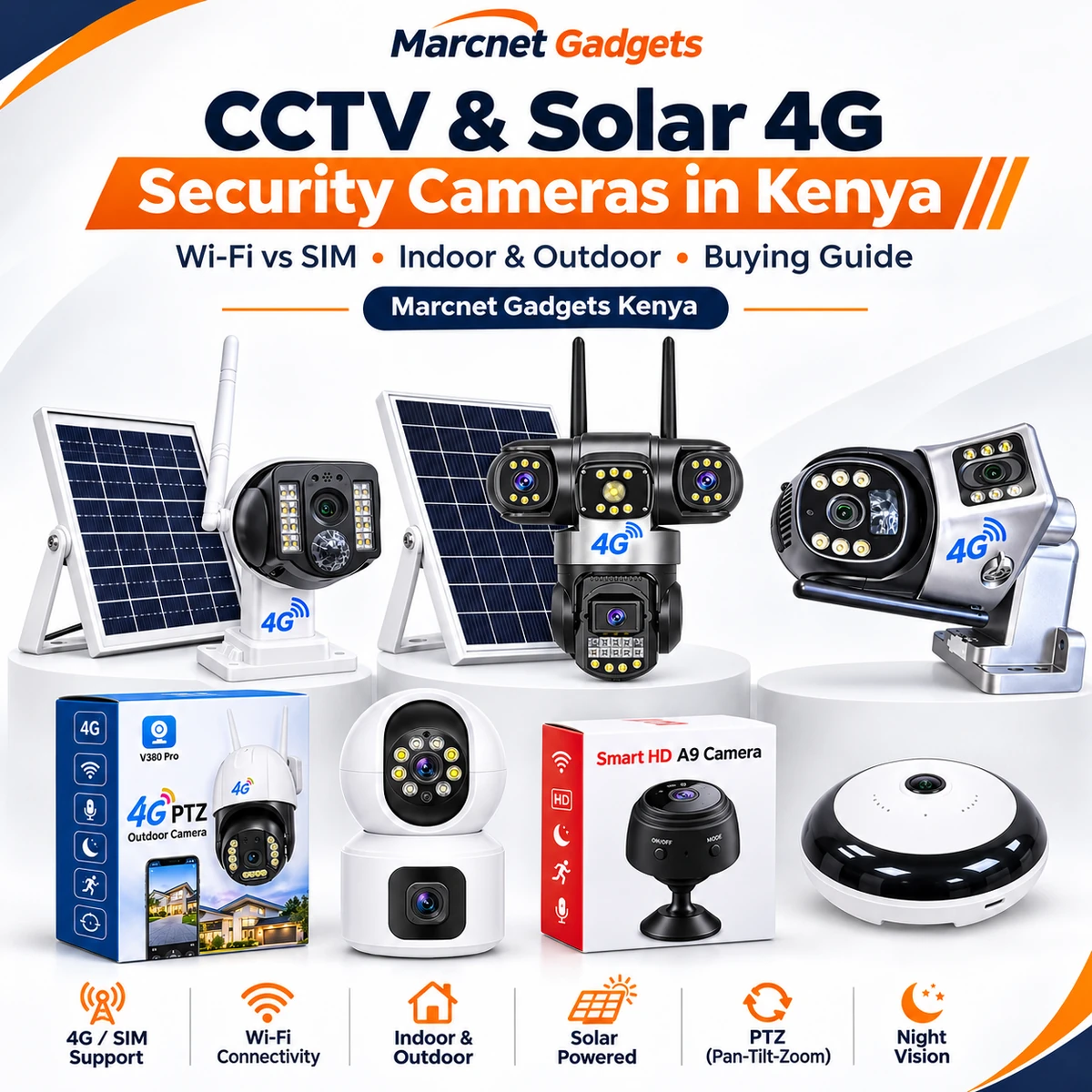
Solar 4G Security Cameras in Kenya offer a practical option for monitoring sites where a suitable mobile-data connection is available, while Wi-Fi cameras can fit homes and offices with an existing wireless network. The right choice is not always the camera with the most lenses or the largest number printed on its packaging. Start with the intended location, available electricity, network signal, recording needs and mounting conditions.
This CCTV & solar camera buying guide covers the 14 security-camera products currently listed by Marcnet Gadgets, across Indoor Cameras, Outdoor Powered Cameras and Outdoor Solar Cameras. It explains the distinctions that matter before ordering without transferring claims from one model to another. A solar camera refers to a power arrangement; a 4G camera refers to a cellular-network connection. One camera can have both, but a solar Wi-Fi camera does not automatically accept a SIM.
1. CCTV & Solar 4G Security Cameras in Kenya: Quick Buying Decision
| Your installation situation | Start with | Why | Essential check |
|---|---|---|---|
| House or office with reliable Wi-Fi and power | Indoor Wi-Fi camera | Uses the existing local network | Compatible Wi-Fi band, app, power and mounting |
| Outdoor position with mains power but no convenient Wi-Fi | Outdoor powered 4G model | Uses a compatible mobile-data service | SIM bands, 4G signal, weather rating and power adapter |
| Gate, farm or construction area without mains electricity | Solar 4G camera | Combines solar charging with mobile connectivity | Actual battery, solar panel, SIM service and event-recording mode |
| Outdoor position with Wi-Fi but difficult mains wiring | Solar Wi-Fi camera | Solar charging without needing cellular data | Wi-Fi signal at installation point and daily solar exposure |
| Wide indoor room or entrance | Fisheye, panoramic or PTZ design | Different viewing approaches for different spaces | Actual field of view, lens count and control functions |
The order of decisions matters: first network, second power, third monitoring coverage, then image quality and recording features. A camera that cannot connect or stay charged will not become suitable simply because it has additional lenses.
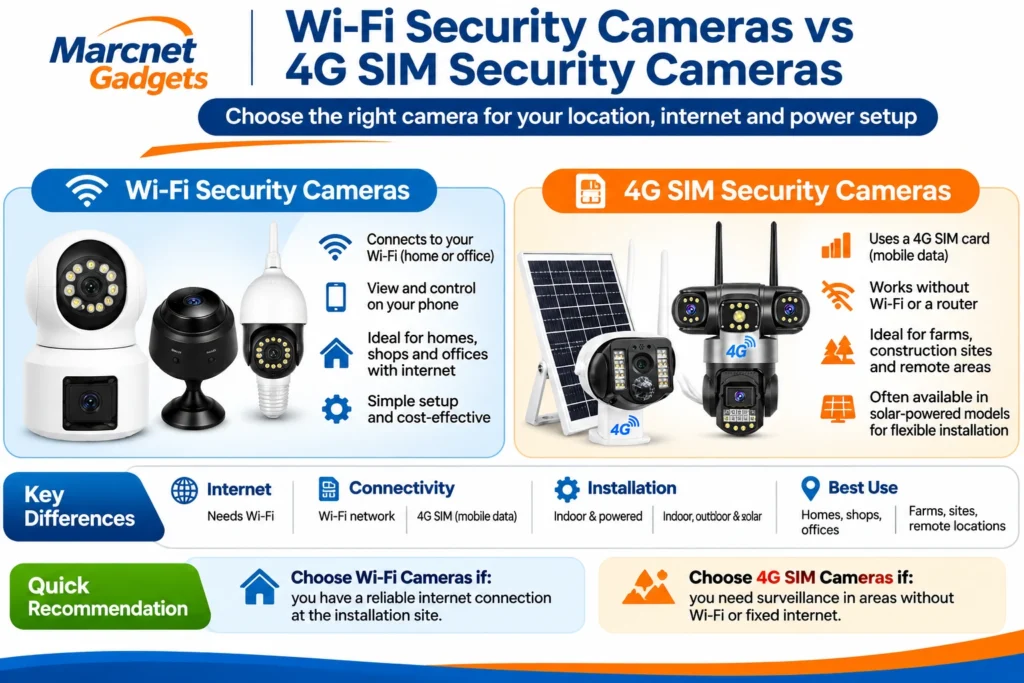
2. Wi-Fi Cameras vs 4G SIM Security Cameras
A Wi-Fi camera connects to a compatible local wireless network. Depending on the precise camera and app, remote smartphone access may be available once the network has internet access. Wi-Fi does not mean the camera works without electricity; a powered Wi-Fi unit still needs its specified power source. Where the camera is too far from the router, test connectivity at the exact installation position rather than assuming the phone’s signal bars predict performance.
A 4G SIM camera uses supported mobile-network service and a suitable data plan. This can be useful where no broadband Wi-Fi exists, such as a detached store, site cabin, rural entrance or remote property. It still requires power; 4G is a communication method, not a battery specification. Confirm the SIM size, network bands, carrier compatibility, data availability and any activation requirements with the exact product before mounting. Some cameras use a specific application or provisioning method.
In Marcnet’s current solar category, the dual-lens Wi-Fi solar model and the Wi-Fi solar PTZ model are explicitly different products from the single-, dual- and triple-lens 4G solar alternatives. To understand how SIM-based internet and Wi-Fi networks differ more generally, see the earlier MiFi vs 4G Router in Kenya guide.
3. Solar Power vs Outdoor Mains Power
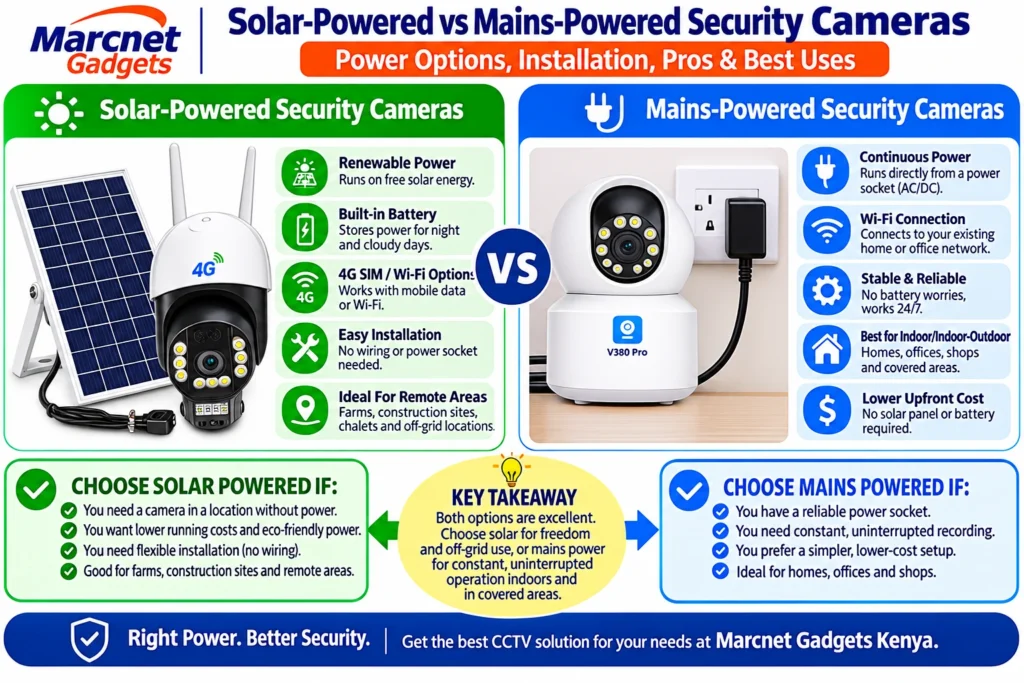
A solar security-camera kit generally depends on a panel, charging circuitry and a rechargeable battery or energy storage within the compatible camera system. Solar charging does not prove 24-hour continuous recording or unlimited battery operation. Shading, panel orientation, dust, cloud cover, motion events and the actual power consumption can all affect the available runtime.
For an outdoor powered camera, electricity remains a separate installation requirement. A 4G-powered model may still need a fixed power adapter even though it sends its video over a mobile network. Plan safe cable routing, appropriate weather protection for plugs and a mounting position that preserves the specified protection of the exact unit.
For a solar site, inspect sunlight exposure over the day, not just at midday. If a panel is mounted beneath a roof overhang or behind trees, the camera may depend heavily on stored battery power. The general solar-placement principles in Reolink’s solar-panel support guidance are helpful, but are not an endorsement or specification of Marcnet’s V380 models.
4. Indoor Security Cameras: Seven Marcnet Models
Marcnet currently lists seven indoor camera products. They address different indoor installation styles rather than one universal application. Compare the following real catalogue choices:
- A9 Mini Wi-Fi 1080P HD Security Camera with Night Vision: compact Wi-Fi design; its specific product page states 1920 × 1080 video, infrared night vision and motion detection. Check storage, app and power details separately.
- V380 Pro 360° Fisheye Panoramic WiFi Indoor Security Camera – Two-Way Audio: Wi-Fi fisheye/panoramic indoor design with two-way audio stated in its listing title. Confirm real viewing geometry before choosing a mounting height.
- V380 Pro 360° Panoramic Bulb Wi-Fi Camera with Two-Way Audio: panoramic bulb-format Wi-Fi option with listed two-way audio. Confirm socket/power compatibility for the actual unit.
- V380 Pro 4MP Dual Lens 4G SIM PTZ Security Camera: a notable indoor-category 4G SIM option; its product title identifies 4MP, dual lenses and PTZ. Do not assume it uses Wi-Fi just because it is grouped with indoor cameras.
- V380 Pro Dual Lens Bulb Wi-Fi PTZ Security Camera – Two-Way Audio: dual-lens bulb-style Wi-Fi PTZ unit with listed two-way audio; verify operating modes and power arrangement.
- V380 Pro Dual Lens Wi-Fi PTZ Baby Monitor Security Camera: Wi-Fi dual-lens PTZ camera marketed for compatible baby-monitor-style use. Consider placement and privacy, particularly inside living spaces.
- V380 Pro PTZ Bulb Wi-Fi Security Camera with Two-Way Audio: Wi-Fi PTZ bulb camera with listed two-way audio; check the supplied fitting and setup guide.
For an indoor environment, check whether the camera’s intended field of view covers the entrance or room rather than relying only on “360°” in the product name. Also verify mounting, noise, status LEDs and the practicality of servicing or resetting the device after installation.
5. Outdoor Powered 4G CCTV Cameras
The Outdoor Powered Cameras category currently contains two V380 Pro 4G PTZ products:
- V380 Pro 4G Outdoor Waterproof PTZ Security Camera with Two-Way Audio: a 4G outdoor unit whose listing identifies PTZ, weather-oriented design and two-way audio. Confirm its exact ingress-protection rating, antenna arrangement and power requirements.
- V380 Pro Dual Lens 4G Outdoor PTZ Security Camera with Two-Way Audio: a 4G outdoor PTZ model with two lenses and two-way audio in its listed name. Verify whether the two views serve separate fixed and movable angles on the exact hardware.
These models are appropriate to compare where power is available but fixed broadband is absent or inconvenient. 4G does not make a camera solar-powered. If a gate or perimeter position needs a permanent wired power source, plan installation and maintenance accordingly. Do not infer IP66/IP67, waterproof connectors, NVR interoperability or uninterrupted cloud recording merely from the word “outdoor”.
6. Outdoor Solar CCTV Cameras: Five Marcnet Models
The Outdoor Solar Cameras category contains five products, including both Wi-Fi and 4G connection types. Read the network label carefully:
- V380 Pro Single Lens 4G Solar PTZ Security Camera with Two-Way Audio: single-lens 4G solar PTZ, with two-way audio named in the listing. A starting point if the project needs a cellular solar configuration without specifying extra lenses.
- V380 Pro Dual Lens 4G Solar PTZ Security Camera with Two-Way Audio: dual-lens 4G solar PTZ, with two-way audio listed. Compare practical angles and the supplied solar panel with the single-lens option.
- V380 Pro Triple Lens 4G Solar PTZ Security Camera with Two-Way Audio: triple-lens 4G solar PTZ, with two-way audio listed. A greater lens count alone does not establish better night performance or battery endurance.
- V380 Pro Dual Lens Wi-Fi Solar PTZ Security Camera with Two-Way Audio: dual-lens Wi-Fi solar PTZ. It needs a suitable Wi-Fi network rather than being assumed to operate on a SIM.
- V380 Pro Solar PTZ Outdoor Wi-Fi Camera: solar-powered outdoor Wi-Fi PTZ product. Confirm the coverage of the wireless network at the chosen mounting point.
Use the first three as the 4G solar group and the latter two as the Wi-Fi solar group. Ask Marcnet to confirm the actual solar-panel wattage, supplied battery specification, weather rating, charging connector, memory-card limit and recording modes before committing to a remote installation.
7. Single Lens vs Dual Lens vs Triple Lens: What Changes?
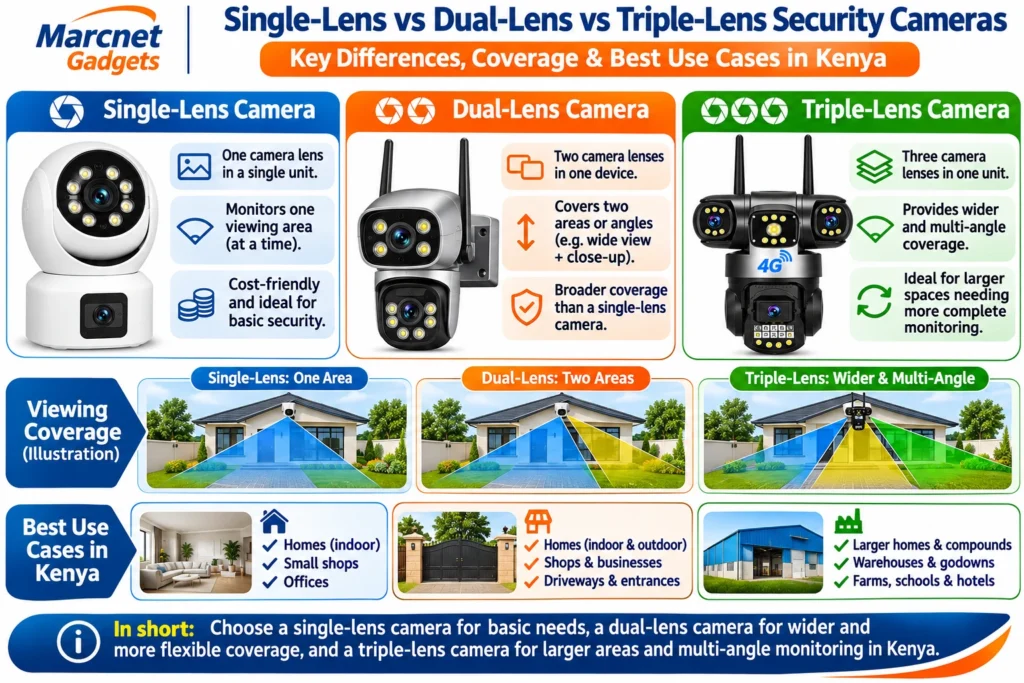
A single-lens camera has one optical view; it may still offer PTZ movement depending on the model. A dual-lens product incorporates two lenses, but the benefit depends on how the manufacturer configures them: separate views, complementary fixed/PTZ views or another arrangement. A triple-lens product increases the number of optical elements, but that does not tell you the resolution of each lens, the number of independent streams or the recording format.
Ask three questions: what does each lens actually show, can the camera record the views you require, and does the companion app expose the needed controls? For Marcnet’s current range, compare the single-lens 4G solar camera, dual-lens 4G solar camera and triple-lens 4G solar camera by their verified model specifications rather than assigning invented camera angles or battery figures.
8. PTZ vs Panoramic/Fisheye vs Fixed-View Cameras
PTZ refers to pan, tilt and zoom functions, although the type and extent of zoom vary by camera. The availability of an app-based movement control does not establish optical zoom. A panoramic or fisheye design instead uses a wide view and may offer software dewarping or different visual modes if supported. A fixed-view camera has a relatively stable mounting direction.
For a warehouse aisle or gate, you may value an adjustable PTZ view; for an indoor central position, a panoramic design might better suit the room. If you need to monitor two areas simultaneously, verify whether the exact multi-lens model provides two usable views at the same time. Avoid treating the marketing term “360°” as a guarantee of complete, obstruction-free coverage.
9. Resolution, Night Vision and Motion Alerts
Compare real recorded clarity rather than only a headline such as HD, 1080P, 4MP or 2K. The A9 Mini Wi-Fi camera has a clearly stated 1920 × 1080 specification, and the V380 Pro 4MP Dual Lens 4G SIM camera includes 4MP in its catalogue name. Neither value should be copied across other V380 products without evidence.
Night vision is also model-specific. Check whether it uses infrared, white LEDs, automatic switching or other functions, and ask for sample results from the exact stock where necessary. Motion alerts depend on detection settings, app notifications and network connectivity; they do not automatically mean human or vehicle classification. A fast internet connection also does not compensate for poor lighting or an obstructed view.
10. Storage: Memory Cards, Cloud Accounts and Recording Modes
Before buying, find out where video is saved. Some camera setups may use local memory cards, supported cloud services or an external recording system. You must confirm which method the exact model supports, the maximum supported storage capacity and whether any paid service is needed. Do not assume that a camera includes a memory card or free cloud storage just because an app is mentioned.
Ask whether recording is continuous, event-triggered or manually initiated. Solar/battery cameras in particular may prioritize event recording for energy efficiency. For a shop requiring an uninterrupted evidence trail, confirm support for the required recording mode and power budget before installation. Check the storage-retention setting and the procedure for downloading footage when an incident occurs.
11. SIM Compatibility, Mobile Data and Remote Viewing
For 4G models, test the intended network at the actual site. A mobile handset may show coverage in one part of a compound while a mounted camera under a metal roof receives a weaker signal. Verify local operator compatibility, 4G bands, SIM size, APN or activation steps and the relevant data package for the supplied device. Data consumption depends on resolution, compression, viewing frequency, notifications and recording/upload behaviour; no fixed monthly allowance is guaranteed by this buying guide.
Wi-Fi models need a compatible wireless network and whatever internet access their remote-viewing method requires. If several cameras will be installed in a building, plan wireless coverage first. A compatible repeater or access point may improve an existing Wi-Fi network, but it does not turn a Wi-Fi-only camera into a cellular device. Review our network and signal guide for the related connectivity distinctions.
12. Camera App Setup and Mobile Access
Most stocked options in this range carry the V380 Pro name. Product names are useful clues, but the correct app version, account setup and supported mobile operating systems should be confirmed using the manual or QR code supplied with the exact device. Do not install an unrelated app merely because two cameras look similar. Also do not transfer V380-related app claims to the A9 mini camera without checking its documentation.
Perform a complete setup test before drilling the final mounting holes: power on the camera, connect it to the intended network, complete the authorised account pairing, view a live image, test motion or PTZ functions where supported, check local/cloud storage and confirm that the feed can be accessed as intended. Keep the reset and device ownership-transfer instructions with your installation records.
13. Planning Solar Camera Installation in Kenya
A solar installation succeeds when power, coverage and maintenance are planned together. The panel needs suitable unobstructed sunlight, and the camera needs a secure mounting point with the required field of view. Evaluate shade from trees, building projections and future vegetation growth. Check roof exposure and how the cable from the panel enters or connects to the camera without compromising sealing or strain relief.
Take local weather into account: dust and rain can affect panel cleanliness, and a battery used heavily for frequent motion events may need more charging opportunity. Before purchase, verify the actual panel and battery characteristics of the selected V380 unit. General advice about solar camera technology does not certify a particular camera’s runtime, so avoid promising a fixed number of days without sun.
14. Outdoor Weather Protection, Mounting and Power Safety
For any outdoor camera, confirm the stated IP rating and whether it applies to the camera housing, power adapter and any external connectors separately. Mounting a unit with a weather-oriented product title does not mean an exposed plug or open reset-port cover can safely sit in rain. Plan access for cleaning, firmware updates and eventual battery servicing.
For powered units, use appropriate qualified installation where mains wiring or difficult exterior routing is involved. Avoid insecure extensions and exposed joints. Keep camera placement lawful and respectful of neighbouring properties and private spaces. If operating cameras for a workplace or public-facing business, establish who may view footage, how long it is retained and how incidents are handled under applicable requirements.
15. Secure Your Cameras and Protect Video Access
A security camera should not create a new security weakness. Change default credentials, protect any cloud/app account with a strong unique password, enable multi-factor authentication where available and keep firmware and companion applications updated. Review remote-sharing permissions before giving staff or contractors access. These are general good practices described by the US FTC’s camera-security guide and the UK NCSC’s smart-camera guidance.
Secure the router and local Wi-Fi if the device uses Wi-Fi. Limit who can retrieve recordings and avoid exposing sensitive living or work areas unnecessarily. Because camera apps and updates vary by model, ask which support and update options are available for the actual device supplied by Marcnet.
16. Choosing Cameras for Homes, Shops, Farms and Construction Sites
Home or apartment: A compact indoor Wi-Fi camera can be convenient where power and a compatible wireless network exist. Consider the A9 mini camera or a relevant V380 indoor variant after confirming app and storage needs.
Shop, office or stockroom: Identify the doors and stock areas that require monitoring. Wi-Fi PTZ, panoramic or indoor 4G SIM options serve different network conditions. If evidence retention is essential, confirm the recording method before deployment.
Farm, remote gate or construction site: Start with the actual coverage and solar conditions. Compare the three listed 4G solar choices, then check panel, battery and SIM details. A powered 4G outdoor alternative can be relevant when reliable power is already provided.
Restaurant or reception area: Think about sight lines, lighting and staff/customer privacy. A panoramic or bulb-style camera may have a different perspective than a wall-mounted PTZ device. If several views are required, confirm whether a multi-lens unit delivers them in the way needed.
17. Marcnet Camera Model Comparison — All 14 Products
The following is a catalogue identity matrix, not a claim that every product has identical functions. Features are limited to model titles or separately retrieved details.
Treat the category grouping as the store’s current allocation, not a substitute for installation specifications. Particularly for the 4G camera in the Indoor Cameras collection, choose by its connection type rather than its category label alone.
18. Common Setup Problems and Practical Troubleshooting
| Symptom | Check first | Why it matters |
|---|---|---|
| Wi-Fi camera will not connect | Correct Wi-Fi network, supported band, password and power | Network incompatibility or a weak signal can stop pairing |
| 4G camera stays offline | SIM activation, plan, local signal, supported bands and APN requirements | The camera needs an active compatible mobile connection |
| Solar camera loses power | Panel sunlight, cable connection, battery condition and events | Solar charging and power use must remain balanced |
| Remote view works intermittently | Mobile data or Wi-Fi quality, app account and device power | Both the camera and viewing device require suitable access |
| No recordings found | Card/service support, capacity, recording mode and time settings | Remote live view alone does not prove stored footage exists |
| PTZ or alerts do not work as expected | Model capability and authorised app settings | Features advertised on other models may not apply |
If the exact unit’s configuration is uncertain, stop short of repeated resets. Retain any model label, instructions and serial identifiers for support. Never share passwords or access codes publicly when requesting help.
19. Frequently Asked Questions About CCTV and Solar 4G Cameras
Is a solar camera automatically a 4G SIM camera?
No. Solar refers to charging/power, not the internet connection. Marcnet lists both Wi-Fi solar and 4G solar cameras. Choose the correct product and verify its network requirements.
Can a 4G camera work where there is no Wi-Fi?
A supported 4G model can communicate over a compatible mobile-data service without local Wi-Fi. It still needs electricity or its specified battery/solar power arrangement.
Does a 4G camera need a monthly data bundle?
It needs a suitable active data service for the functions that use mobile networking. Exact consumption and any recurring charges depend on the camera, its settings and the service provider.
Does a solar camera record continuously for 24 hours?
Not necessarily. Continuous or event-based recording must be verified on the exact model, together with battery capacity, solar charging and storage support.
Is a dual-lens or triple-lens camera always better than a single lens?
No. Compare the actual views and resolution per lens, software controls, storage and site needs rather than treating lens count alone as a quality score.
Which Marcnet camera is a compact indoor Wi-Fi option?
The A9 Mini Wi-Fi 1080P HD Security Camera is a listed compact indoor choice, with 1920 × 1080 video, night vision and motion detection described on its own product page.
Are outdoor cameras automatically waterproof?
No. Confirm the supplied unit’s actual ingress-protection rating and protect power connections according to the installation instructions.
What is the difference between PTZ and a panoramic camera?
PTZ describes controlled movement or zoom functions on supported models. A panoramic/fisheye design offers a wide-angle view. Their practical coverage and controls depend on the exact hardware.
Do all V380 cameras have the same storage and mobile app features?
Do not assume so. Confirm the app, storage types, memory-card size, cloud account requirements and firmware for the exact camera supplied.
Can I install a Wi-Fi solar camera at a remote gate without a router?
Only if the camera has a compatible Wi-Fi network available at the gate. Solar power does not replace network connectivity. A genuine 4G solar model may be more appropriate if supported mobile coverage exists.
What should I ask Marcnet before ordering a solar CCTV camera?
Share the proposed installation location, available mobile signal or Wi-Fi, power availability, preferred number of views and storage needs. Ask for confirmation of the exact model’s SIM compatibility, solar-panel and battery specification, waterproofing, included accessories and remote-viewing setup.
20. Final Checklist: Shop CCTV and Solar Security Cameras in Kenya
Before checkout, confirm these practical points:
- Network: Wi-Fi or 4G SIM; test availability at the final mounting point.
- Power: mains, rechargeable battery and/or solar; confirm what is supplied.
- Coverage: indoor, powered outdoor or solar outdoor; check actual viewing angle and lens roles.
- Recording: supported memory card, recording schedule and any cloud subscription.
- Software: correct app, account access and supported phone operating system.
- Weather and installation: specific ingress rating, mount, adapters and cable protection.
- Support: current product availability, exact accessories, compatibility and delivery arrangements.
Browse all Security & Surveillance Cameras, or choose the relevant section: Indoor Cameras, Outdoor Powered Cameras or Outdoor Solar Cameras. Marcnet Gadgets serves customers in Nairobi and across Kenya, subject to the current store delivery arrangements. For an installation needing a SIM, specific lens configuration or battery specification, contact Marcnet with the exact product name before ordering.
Leave a Reply