
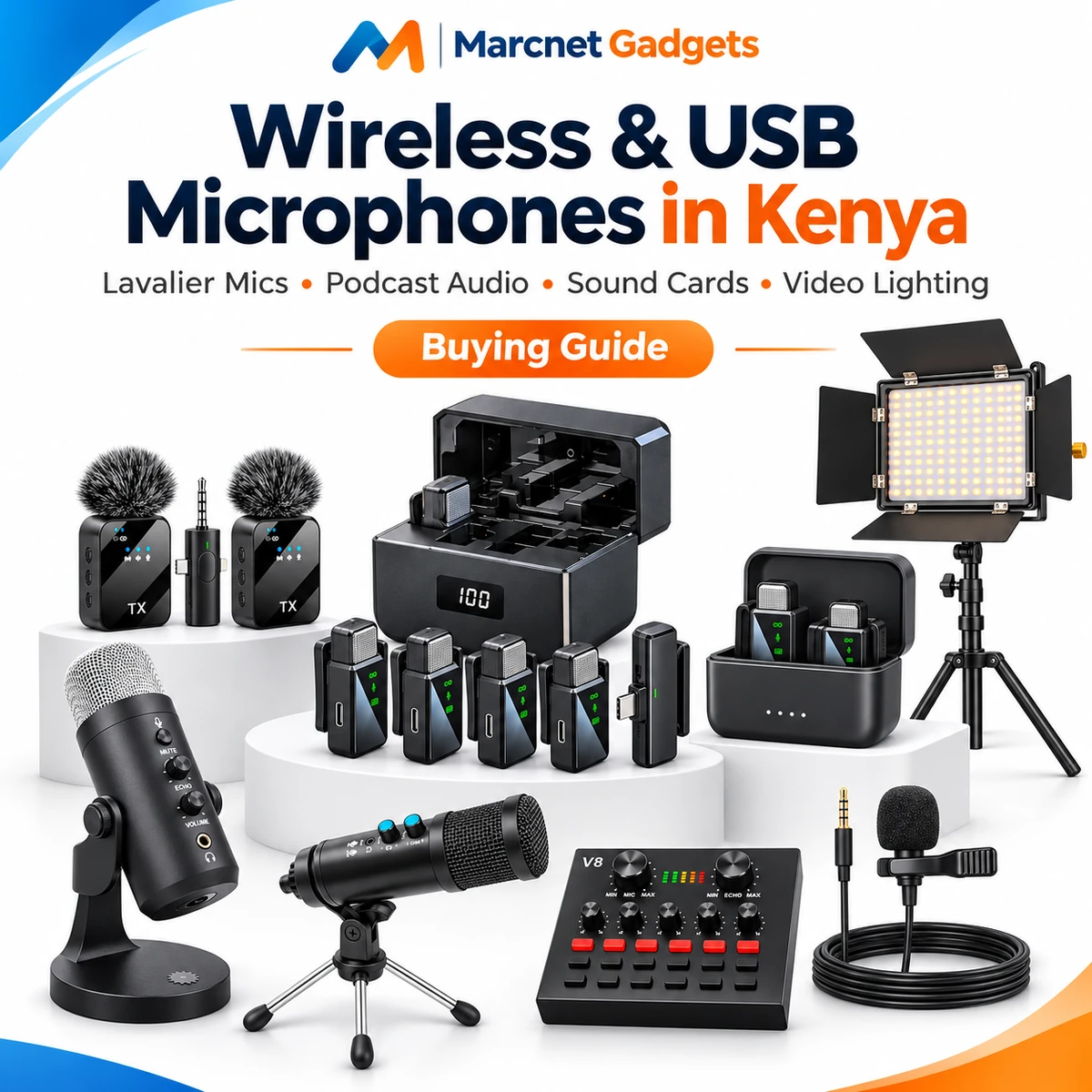
Wireless & USB Microphones in Kenya are easier to choose when you start with the device that will record the sound, the number of speakers, and the lighting available at your filming location. A phone interview, a desktop podcast, a church presentation and a product-video shoot do not all need the same microphone or light. This guide compares Marcnet Gadgets’ live wireless and wired lavaliers, USB condenser microphones, podcast microphone kits, sound cards, ring lights and LED video lights, with direct links to the exact stocked models.
The live Microphones & Lights branch currently shows 32 products across seven specialist categories. We cover the options by the job they perform, not by assuming every USB-C phone, camera, laptop or livestream app accepts every audio accessory.
1. Quick Answer: What Microphone and Light Should You Buy?
For a presenter walking and talking into a smartphone, start with a wireless lavalier system whose supplied receiver matches that specific phone. For a stationary desk recording, a USB microphone is often the simpler starting point. For two presenters, look for a genuine two-transmitter package; for larger groups, check whether the receiver really supports the number of simultaneous channels you need. For lighting a face close to a phone, compare a ring light and its stand. For flexible direction and positioning, compare a dedicated LED video light.
| Recording job | Starting category | Critical check |
|---|---|---|
| Phone interview, mobile content | Wireless Microphones | Receiver plug, phone audio support, number of speakers |
| Budget wired interview | Lavalier Microphones | USB-C, Lightning, 3.5mm wiring and cable reach |
| Desktop voice-over, meeting, streaming | USB Microphones | Computer port, software input selection and monitoring |
| Podcast with mixed audio sources | Podcast Microphones and Sound Cards | Mic sockets, outputs, monitoring and cables |
| Beauty, teaching, face-to-camera video | Ring Lights | Size, stand, power supply, holder quantity |
| Products, interviews, varied lighting positions | LED Video Lights | Placement, stand, battery and lighting controls |
2. Wireless & USB Microphones in Kenya: Which Type Should You Buy?
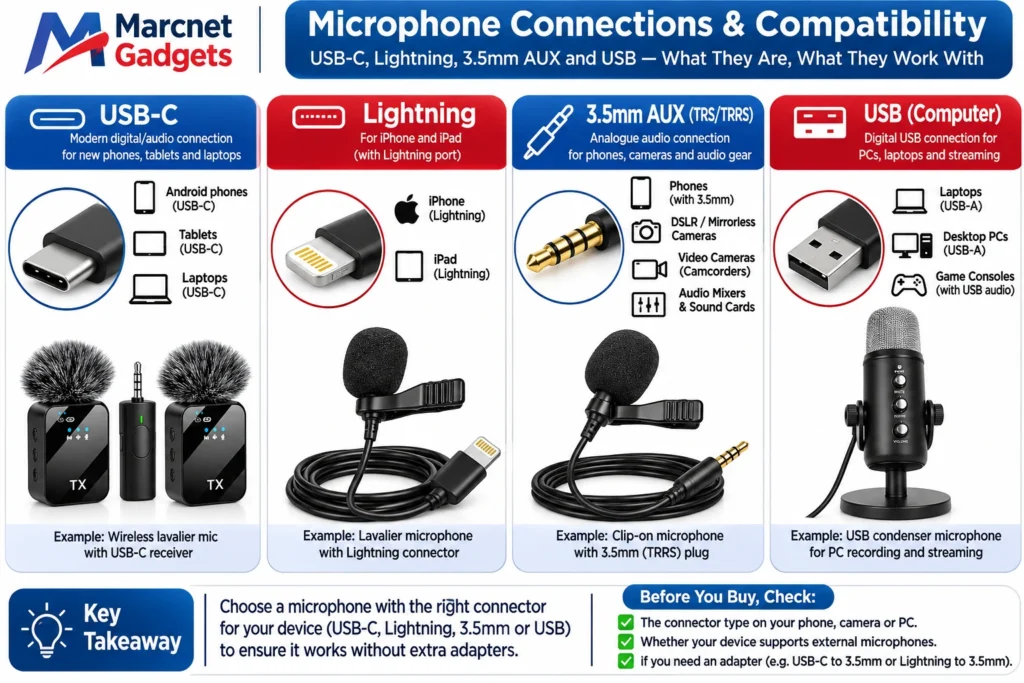
A wireless lavalier usually places a small microphone/transmitter on the presenter and sends sound to a matched receiver at the recording device. It improves freedom of movement but adds pairing, charging, interference and receiver compatibility to the setup. A wired lavalier uses a direct cable; it avoids the wireless link but its connector and cable length must fit the situation. A USB condenser microphone is more suited to a controlled desk setup, where the user can face the microphone consistently and select it in recording software.
Wireless does not automatically mean Bluetooth; a dedicated receiver can be required. Similarly, a microphone marketed as “noise reduction” does not eliminate all traffic, wind, echo or background conversation. Placement and testing remain important.
3. Phone Microphone Connections: USB-C, Lightning and 3.5mm AUX
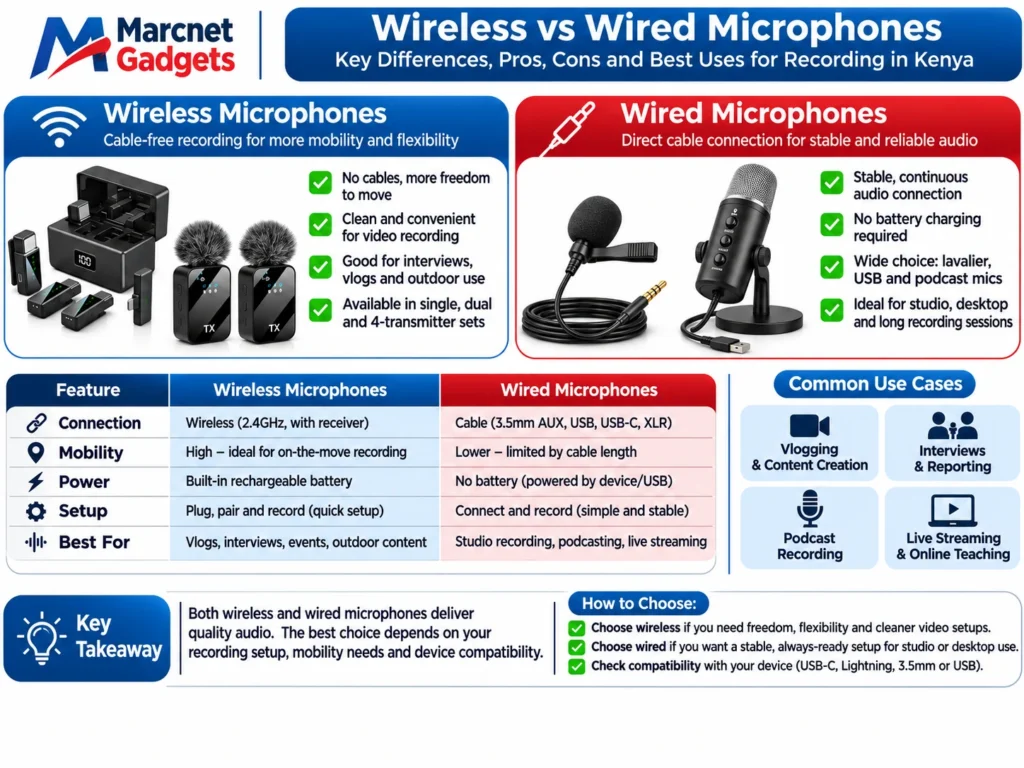
USB-C: Match the receiver or microphone to the recording device’s supported USB digital-audio input. A USB-C-shaped port alone does not guarantee that every microphone will be recognised. Lightning: Check the actual iPhone or iPad port and app compatibility; newer and older Apple devices can use different connectors. 3.5mm AUX: Check whether the jack is a microphone input, headset combo input or line input, and whether the pinout is TRS or TRRS. A passive plug adapter cannot always convert an incompatible signal type.
If the phone reports that no external microphone is detected, try the supplied receiver without an extension, check permissions, reconnect it, and record a short test. Avoid buying solely from the connector printed on the box; compare the exact phone model and the accessory package.
For additional guidance on microphone plug compatibility, read RØDE’s explanation of TS, TRS and TRRS connectors. It explains why microphones and recording devices with similar-looking 3.5mm sockets may require different cables.
4. Single, Dual and Four-Transmitter Wireless Microphone Sets
One transmitter can work for a single presenter. Two transmitters suit a host and guest or two presenters. A product described as a 1-to-4 system may be appropriate where multiple people must be captured, but verify the supported simultaneous channels, receiver, recording-device input and how tracks are combined. A four-person configuration is not automatically four separate audio tracks in the destination application.
For instance, the dual-channel UHF lavalier system lists two transmitters and a receiver for compatible UHF setups, while the Intelligent 1-to-4 Type-C system is aimed at a different multi-speaker arrangement. The operating frequency, power and included accessories must be taken from each model rather than generalised across wireless microphones.
5. Eight Wireless Microphone Models at Marcnet Gadgets
Marcnet’s Wireless Microphones category currently lists eight products. The core buying differences are receiver connector, transmitter count, charging-case package, mounting style and output required by your phone, camera, PA system or computer. Product titles can describe several variants; confirm the exact option supplied when ordering.
| Stocked Marcnet model | Practical buying check |
|---|---|
| Dual Channel UHF Wireless Lavalier Microphone System – 2 Transmitters | Two transmitters; UHF system; receiver/output compatibility must be checked. |
| F11-2 3-in-1 Dual Wireless Lavalier Microphone – Type-C, Lightning & 3.5mm AUX | Three connection options described; confirm exact supplied receiver and device fit. |
| Intelligent 1-to-4 Type-C Wireless Lavalier Microphone with AI Noise Reduction | One-to-four Type-C system by product name; check receiver and individual input support. |
| K11 Wireless Lavalier Lapel Microphone for iPhone & USB-C – Single/Dual | Single/dual variants; verify variant and connector supplied. |
| K32 Dual Wireless Lavalier Microphone with Magnetic Clip & Charging Case – Type-C/Lightning | Dual microphone with magnetic clip and charging case; verify phone connector. |
| K35 3.5mm AUX Wireless Lavalier Microphone – Single/Dual | 3.5mm receiver; confirm TRS/TRRS and recording-input compatibility. |
| K50 2.4G Dual Wireless Lavalier Microphone with Charging Case – USB-C, Lightning & 3.5mm | 2.4G dual microphone and charging case; confirm supplied receiver options. |
| N6 Pro AI Wireless Lavalier Microphone with Magnetic Clip – Type-C | Type-C receiver, magnetic clip; AI marketing does not guarantee complete noise removal. |
For mobile video, the F11-2 3-in-1 dual lavalier covers Type-C, Lightning and 3.5mm in its listing, but you should still verify the supplied receiver combination. The K32 dual microphone lists a magnetic clip and charging case; the K50 dual 2.4G microphone also lists a charging case. For a more conventional receiver feeding compatible audio equipment, compare the dual-channel UHF set.
6. Four Wired Lavalier Microphones for Phones, Cameras and Computers
A wired lapel microphone can be a practical option for sit-down presentations, teaching or a phone kept close to its subject. Place the capsule near the upper chest, secure the cable against clothing rub and test before recording. Connector appearance must not be used as the only compatibility evidence.
| Stocked Marcnet model | Practical buying check |
|---|---|
| 3.5mm AUX Lavalier Lapel Microphone for Phones & Computers | Wired 3.5mm lapel microphone; phone/computer mic input needs matching. |
| 3.5mm Lavalier Lapel Microphone for Camera & Wireless Transmitter | Camera/transmitter application; exact input wiring must match. |
| GL-120 Lightning Lavalier Microphone for iPhone & iPad | Lightning connector; supported iPhone/iPad model must be checked. |
| USB Type-C Lavalier Lapel Microphone for Phones & Computers | USB-C connector; USB-C port does not guarantee microphone compatibility. |
The 3.5mm AUX wired lavalier and 3.5mm camera/transmitter lavalier should not be assumed interchangeable: microphone-input wiring can differ between cameras, transmitters and phones. The GL-120 Lightning model and USB Type-C model target different device connections.
7. USB Microphones for Podcasting, Voice-Overs and Computer Recording
USB microphones simplify the first connection for compatible desktop or laptop setups because the microphone sends audio over USB, rather than requiring the buyer to assemble a separate analogue recording chain. The recording application must still use the correct input. A quiet room, stable desk mount and sensible microphone distance often matter more to speech quality than unverified promotional sound-quality numbers.
| Stocked Marcnet model | Practical buying check |
|---|---|
| Large Diaphragm USB & XLR Condenser Microphone with Echo, Mute & Stand | USB and XLR listed; confirm included cable and input needs. |
| RGB Large Diaphragm USB Condenser Microphone with Echo, Mute & Stand | RGB lighting and USB microphone; lighting is not an audio feature. |
| USB Computer Condenser Microphone with Echo, Mute & Tripod Stand | USB mic with echo, mute, tripod named in listing. |
| USB Computer Condenser Studio Microphone with Tripod & Volume Control | USB microphone; physical volume control and tripod listed. |
| USB Condenser Microphone with Echo, Mute & Stand | USB mic, echo/mute/stand per product listing. |
Marcnet lists an USB and XLR condenser microphone for buyers comparing two interface paths. The RGB USB microphone adds decorative lighting, whereas the USB studio microphone with volume control emphasises local level control. Choose on connections and recording workflow rather than appearance alone.
8. USB vs XLR: Do You Need an Audio Interface or Sound Card?
USB microphone path: Compatible USB microphone → computer or supported recording device → chosen recording application. XLR microphone path: Compatible XLR microphone → suitable audio interface or mixer with the correct mic input and power requirements → recording device. XLR microphones are not normally plugged into a laptop USB port without the correct interface.
Check whether the selected microphone requires phantom power, whether the chosen interface supplies it and whether the cable is included; do not assume that every microphone labelled “condenser” has the same power arrangement. Consumer sound cards with microphone sockets also vary from dedicated audio interfaces in connector type and signal level.
9. Podcast Microphone Kits: V8 vs V8S Bundles
A bundled podcast kit can reduce the number of separate accessories to source, but buyers should inspect the microphone, mount, sound card, connection cables and recording device before paying. Marcnet’s podcast category lists the V8 microphone podcast kit and V8S microphone podcast kit. Both listings reference an arm stand; exact included components and supported recording connections should be checked for the chosen package.
| Stocked Marcnet model | Practical buying check |
|---|---|
| Professional Condenser Microphone Podcast Kit with V8 Sound Card & Arm Stand | Kit with V8 card and arm stand; exact accessories per selected listing. |
| Professional Podcast Microphone Kit with V8S Sound Card & Arm Stand | Kit with V8S card and arm stand; check connections and accessories. |
When the goal is spoken-word recording, spend time on microphone placement, pop control, room reflections and monitoring. A bundled effect button cannot replace intelligible recording. Multi-person recording may need additional compatible microphones and separate inputs.
10. Sound Cards for Livestreaming: V8, V8S and M9
Sound cards can combine microphone audio, monitoring, phone/computer feeds and selected effects in a creator setup. However, model names alone do not establish universal support for a particular app or computer. Compare actual input and output sockets before connecting powered devices or using adapters.
| Stocked Marcnet model | Practical buying check |
|---|---|
| M9 Podcast Recording Sound Card with 3 Mic Ports & Bluetooth | Three mic ports, USB/OTG PC recording, Bluetooth accompaniment; confirm inputs. |
| V8 Live Podcast Recording Sound Card with Bluetooth & Dual Mic Input | Bluetooth and dual mic input per listing; connection compatibility must be checked. |
| V8S Podcast Recording Sound Card with Bluetooth & Dual Mic Input | Bluetooth and dual mic input per listing; do not assume V8/V8S identical. |
Marcnet’s M9 sound card explicitly lists three microphone ports, USB/OTG PC connections and Bluetooth for compatible accompaniment input; Bluetooth accompaniment does not necessarily transmit the finished mix wirelessly to the recording phone. The V8 and V8S listings describe Bluetooth and dual microphone inputs, but port layout and controls must be checked on the exact unit.
11. Practical Audio Connection Workflows
Phone interview
Confirm a supported phone input → connect the matching lavalier receiver or wired microphone → enable microphone permission if needed → select external audio where available → record a 20-second test while both speakers move as they will during filming.
Desktop voice-over or online meeting
Connect the USB microphone → choose it in the operating system and application → test input level without clipping → check monitoring separately to avoid speaker feedback → make a short recording before the real session.
Podcast with a sound card
Connect a compatible microphone to its assigned sound-card input → connect the card to a supported phone or computer input → confirm software recognition and monitoring → set levels for every speaker → record a dry test before adding effects or music.
12. Ring Light vs LED Video Light: What Is the Difference?
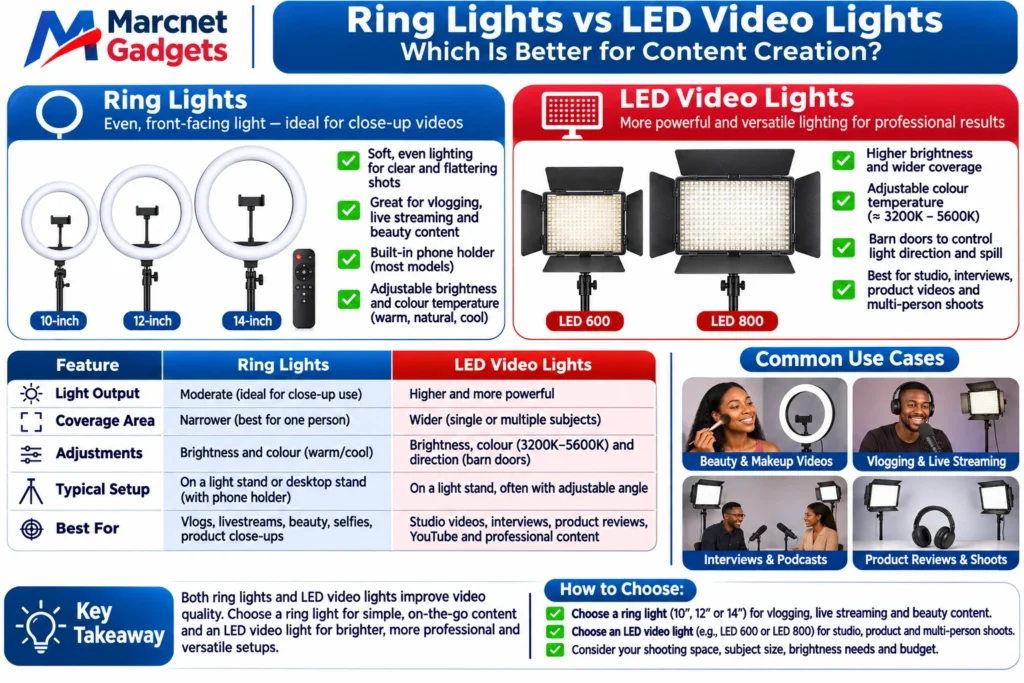
A ring light can position a camera or phone near the centre of an illuminated circle, often useful for face-to-camera videos, demonstrations and short-form content. A rectangular LED video light may offer a different way to direct light onto a subject or product when mounted on its compatible stand. Neither type is universally “better”: subject size, distance, room light, placement and power determine the useful result.
Do not treat a ring-light diameter as brightness, or an LED model number as a measured light-output specification. For both, ask about mounting hardware, battery or mains power requirements, practical controls and the working area you want illuminated.
13. Seven Ring Lights: 10-Inch, 12-Inch, 14-Inch and 18-Inch
Marcnet lists standard and RGB ring lights in several sizes. A larger nominal diameter can allow a larger illuminated opening, but it does not guarantee a certain lux value or that it will be brighter than every smaller unit. A stable stand, a secure phone holder and a usable power source matter in daily filming.
| Stocked Marcnet model | Practical buying check |
|---|---|
| 10-Inch RGB Ring Light with 2.2m Tripod Stand & Phone Holder | RGB, 2.2m tripod, phone holder listed. |
| 10-Inch Ring Light with 2.1m Tripod Stand & Phone Holder | 10-inch light; 2.1m tripod and phone holder listed. |
| 12-Inch RGB Ring Light with 2.2m Tripod Stand & Phone Holder | RGB light, 2.2m tripod and phone holder listed. |
| 12-Inch Ring Light with 2.1m Tripod Stand & Phone Holder | 12-inch light; 2.1m tripod and phone holder listed. |
| 14-Inch RL-14 Ring Light with 3 Phone Holders, Remote, Bag & 2.2m Tripod | 3 holders, remote, bag and 2.2m tripod named. |
| 18-Inch RL-18 Ring Light with 3 Phone Holders, Remote, Bag & 2.2m Tripod | 3 holders, remote, bag and 2.2m tripod named. |
| RGB 18 inch & 3 mode ring light with phone holder and 2.2M tripod stand for | Product title truncated on category; verify 3-mode specification on exact listing. |
The 10-inch RGB model and 12-inch RGB model offer RGB-labelled alternatives; confirm what their actual lighting modes deliver. The RL-14 and RL-18 list three phone holders, a remote and a bag with a 2.2m tripod, which may matter for creator setups involving more than one phone. Compare what is in the particular retail package before ordering.
14. Three Dedicated Video Lights: LED-416, LED 600 and LED 800
For product photography, demonstration tables, interviews and controlled shooting positions, LED video lights may be a practical alternative to a ring light. Marcnet’s LED Video Lights category includes three stocked models; compare the supplied stand, battery configuration, adjustment controls and size against your setup.
| Stocked Marcnet model | Practical buying check |
|---|---|
| Pro LED 600 Video Light with Stand & 2 Rechargeable Batteries | Stand and two batteries named; brightness/output not confirmed. |
| Pro LED 800 Video Light with Stand, 2 Batteries & Remote | Stand, two batteries and remote named; brightness not confirmed. |
| Pro LED-416 Video Light with Battery & 2.2m Stand | Battery and 2.2m stand named; brightness not confirmed. |
The LED 600 lists a stand and two rechargeable batteries, while LED 800 lists two batteries, stand and remote. The LED-416 lists a battery and 2.2m stand. These names do not on their own establish colour temperature, luminous output, battery runtime or suitability for every camera setting.
15. Lighting Position, Stands, Power and Background
Start with the subject rather than the lamp. For a presenter, raise a light to an appropriate angle that does not cause harsh shadows or excessive glare. For small products, try lighting from a side or slightly above while checking reflections on shiny surfaces. Use the tripod on a stable, level surface and secure all cables away from walkways.
When filming indoors, avoid mixing incompatible colour tones from different lights unless that is intentional. When filming outdoors or away from a socket, check whether the specific light supports the available battery arrangement and whether charging and replacements are practical. Do not assume a bundled remote, phone holder or carrying bag is present unless the exact product says so.
16. Recommended Setups for Creators and Businesses in Kenya
| Use case | Audio starting point | Lighting starting point | What to verify |
|---|---|---|---|
| TikTok/Reels product explainer | phone-compatible wireless lavalier | ring light | Phone connector, stand and framing |
| Two-person interview | F11-2 dual microphone or another verified dual receiver | LED video light | Two working audio channels, camera input and placement |
| Desktop voice-over | USB condenser microphone | Optional desk-facing ring light | Computer input, quiet room, headphones |
| Church or teaching event | dual UHF system | Venue-dependent lighting | Compatible PA input, frequencies, mic placement |
| Podcast with guests | podcast kit and compatible sound card | Soft, controllable light | Number of inputs, monitoring, cables |
| Small product photography | Often no external microphone for still photos | LED panel light | Reflections, colour, background, power |
These are starting points for purchasing decisions, not guarantees of compatibility or professional broadcast results. For a camera-into-computer workflow, also consider video input and capture requirements separately from microphone selection.
17. Common Problems and Troubleshooting Checks
External mic not detected
Recheck the device’s actual input and the supplied receiver; disconnect adapters; grant microphone permissions; restart or reconnect where appropriate; test in the default voice-recorder application.
Voice is too quiet, clipped or distorted
Check microphone placement, recording-device input level, sound-card gain, clothing contact and any limiter/processing settings. Move the microphone away from rubbing fabric or wind and retest.
Wireless drops out or crackles
Charge transmitter and receiver, reduce obstacles, keep antennas clear where applicable and test in the intended environment. Wireless range varies; do not rely on an unverified maximum-distance claim.
Light is harsh, unstable or not powering on
Reposition the light, stabilise the stand, verify battery charge or power adapter, and check that the chosen holder safely supports the phone. Do not force incompatible batteries or adapters.
18. Pre-Purchase Compatibility Checklist
- Write down the exact phone, camera, computer or mixer model.
- Identify the input: USB-C digital audio, Lightning, 3.5mm TRS/TRRS, XLR, USB or compatible receiver socket.
- Count the speakers and decide whether they must be recorded simultaneously.
- Confirm the included transmitters, receiver, cable and charging equipment.
- Check whether the mic, sound card and app support the desired recording path.
- Choose a light based on subject distance, available power and stand height.
- Confirm the exact ring-light or LED-light accessories in the selected package.
- Check the current product page for price and availability before checkout.
19. Frequently Asked Questions About Microphones and Video Lighting
Which wireless microphone works with my iPhone?
Check whether your exact iPhone uses Lightning or USB-C, then match it to the supplied receiver and the recording app. Model names alone cannot guarantee compatibility.
Will any USB-C microphone work with an Android phone?
Not necessarily. The phone must support the relevant USB audio connection, and the receiver or microphone must be compatible with the phone and app.
Is a 3.5mm lavalier the same as a 3.5mm headphone cable?
No. Matching diameter does not guarantee the required microphone wiring, pinout or signal type.
Are wireless lavalier microphones always Bluetooth?
No. Many use a dedicated wireless transmitter-and-receiver link, including 2.4GHz and UHF systems.
Is a dual microphone better for two people?
A verified two-transmitter receiver system is usually more practical for two separate speakers. Check simultaneous-channel support and how audio is delivered to the recorder.
Can a USB microphone connect directly to a phone?
Only when the phone, microphone, cable/adapter and recording software support that USB audio arrangement.
Do I need an interface for an XLR microphone?
You need a compatible input path, commonly an audio interface or mixer, and must confirm power and cable requirements.
What is the difference between V8 and V8S sound cards?
They are separate stocked products. Compare the exact ports, controls, compatibility and accessories rather than assuming identical features.
Is the M9 Bluetooth connection a wireless microphone receiver?
The stocked M9 product describes Bluetooth for accompaniment. Confirm the microphone input and recording output separately; do not infer that Bluetooth carries the finished recording.
Is an 18-inch ring light always brighter than a 10-inch one?
No. Diameter alone does not establish measured brightness; inspect model-specific output, working distance and controls.
Which LED panel should I use for product photography?
Compare the intended subject size and distance with each stocked LED-416, LED 600 or LED 800 product, along with stand and power needs.
Do ring lights and video lights include batteries and tripods?
Included accessories vary. Check the exact model listing; a tripod, remote, battery or holder should never be assumed from a category alone.
20. Shop Wireless Microphones, USB Microphones and Video Lighting in Kenya
Browse the full Marcnet Microphones & Lights catalogue or go directly to Wireless Microphones, Lavalier Microphones, USB Microphones, Podcast Microphones, Sound Cards, Ring Lights and LED Video Lights. Product pages show current options and purchasing information; check the exact model and connector before placing an order.
Marcnet Gadgets serves customers in Nairobi and across Kenya through its normal ordering and delivery arrangements. When recording-device compatibility or package contents are uncertain, contact the store with your exact device model and the intended microphone or light before buying.
Leave a Reply