
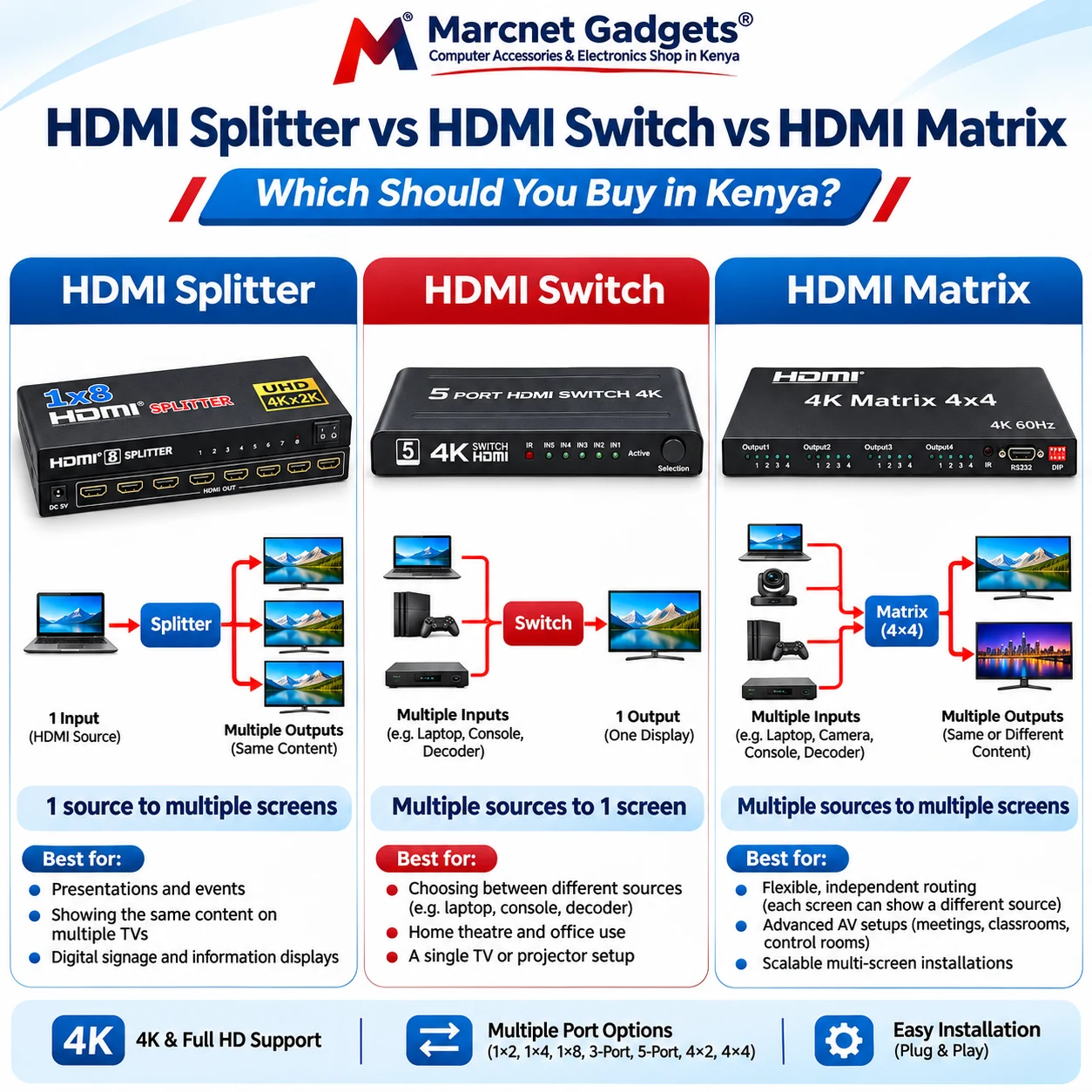
Choosing the right HDMI device can save you money, simplify your connections and prevent common display problems.
Whether you want to connect one laptop to several TVs, switch between a decoder and gaming console, or control different video sources across multiple screens, understanding the difference between an HDMI splitter, HDMI switch and HDMI matrix is important.
These devices may look similar, but they perform different functions.
At Marcnet Gadgets Kenya, customers can explore HDMI distribution and control equipment for homes, offices, meeting rooms, businesses and commercial AV installations.
This buying guide explains how each device works, compares common configurations and helps you find the right equipment for your setup.
1. What Is an HDMI Splitter?
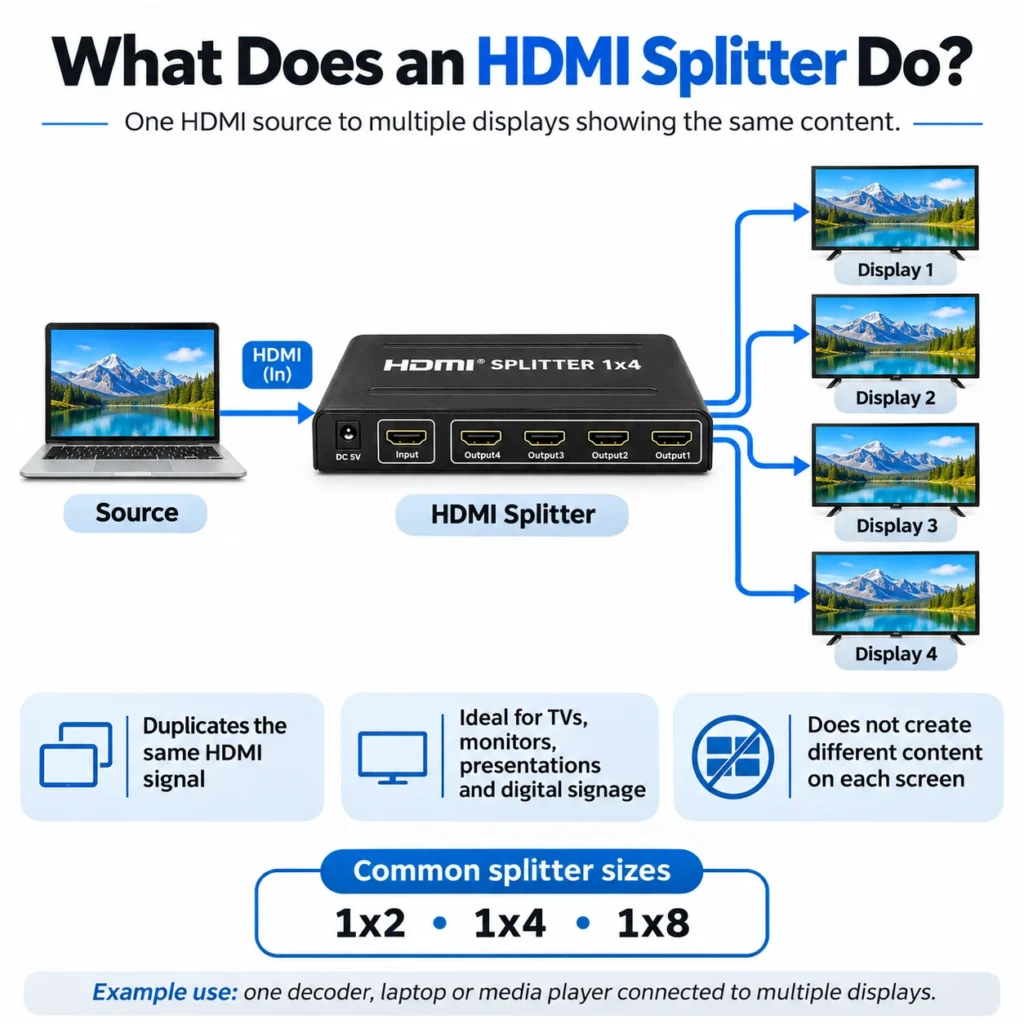
An HDMI splitter takes the signal from one HDMI source and distributes it to two or more compatible displays.
For example, you may want one laptop presentation to appear on two televisions at the same time.
A typical configuration is:
1 HDMI input → 2 HDMI outputs
This is called a 1×2 HDMI splitter.
Larger splitters can distribute the same source signal to four or eight displays, depending on their available outputs.
When should you buy an HDMI splitter?
An HDMI splitter is useful when you want to:
- Show the same presentation on multiple screens.
- Display one media player on two compatible televisions.
- Distribute identical content around a shop or office.
- Connect one HDMI source to several compatible monitors.
Important: An ordinary HDMI splitter mirrors the source signal. It does not create an extended desktop where each monitor displays independent content.
HDMI Splitters Available at Marcnet Gadgets
Designed for setups requiring one HDMI source to be connected to two compatible displays showing the same content.
An option for distributing one HDMI source to four compatible displays in an office, meeting room or commercial setup.
Consider this configuration when an installation requires up to eight HDMI display outputs showing the same source.
Before purchasing, compare supported resolutions, power requirements, HDMI compatibility and cable distances.
Browse HDMI Splitters & Switchers at Marcnet Gadgets
2. What Is an HDMI Switch?
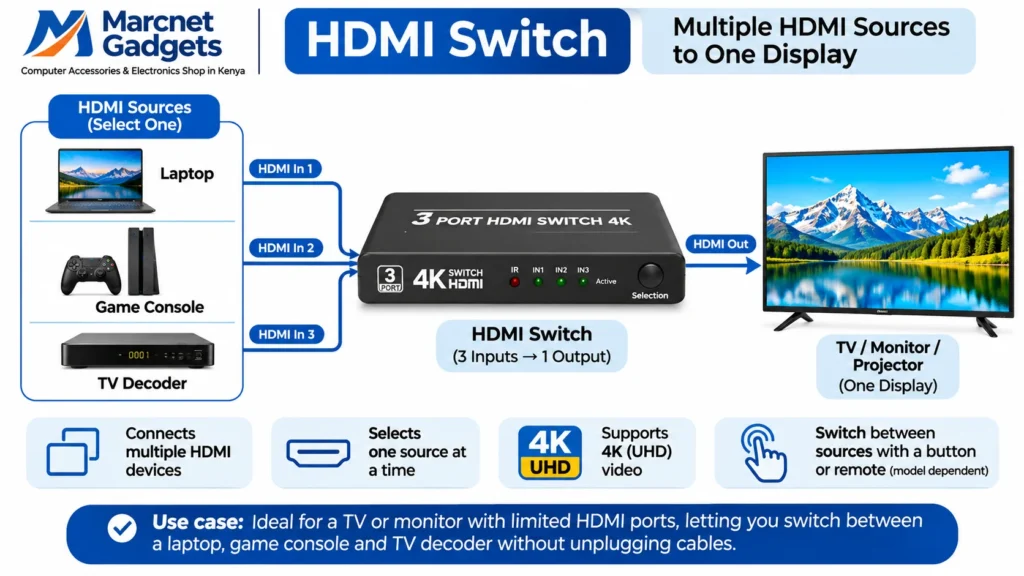
An HDMI switch connects multiple HDMI source devices to one display.
Imagine a TV with only one available HDMI input, but you want to connect a laptop, gaming console and television decoder.
Instead of repeatedly unplugging cables, an HDMI switch lets you select which source appears on the screen.
A typical configuration is:
3 HDMI inputs → 1 HDMI output
This is called a 3×1 HDMI switch.
When should you buy an HDMI switch?
Choose an HDMI switch when you need to:
- Connect multiple devices to one television.
- Change between computers or presentation sources.
- Use several media players with one projector.
- Reduce repeated HDMI cable disconnection.
- Select between different HDMI devices at a workstation.
Some models provide remote-control or automatic switching options, but available controls vary by product.
HDMI Switches Available at Marcnet Gadgets
3-Port HDMI Switches
These options are suitable when you need to connect up to three compatible HDMI source devices to one screen.
5-Port HDMI Switches
Consider these when you have more HDMI devices than a typical three-input setup can accommodate.
7-Port HDMI Switch
For installations requiring additional source connections, Marcnet also lists a higher-input configuration:
Always check the individual product specifications to confirm supported resolution, refresh rate, control functions and device compatibility.
3. What Is an HDMI Matrix Switch?
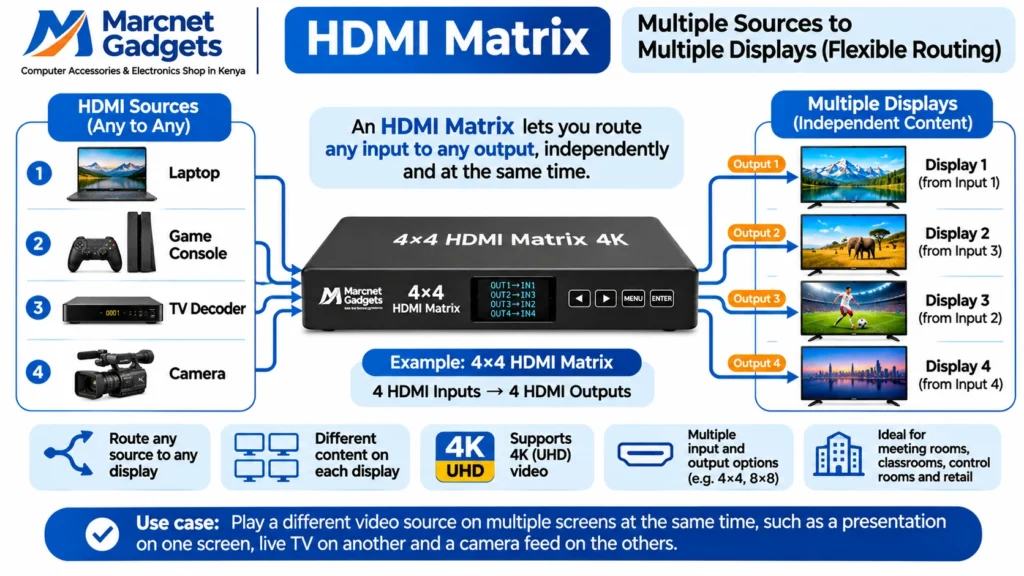
An HDMI matrix switch provides flexible routing between multiple HDMI source devices and multiple displays.
Unlike an ordinary HDMI splitter, a suitable matrix allows different connected displays to select different source signals.
For example, an office could connect several laptops and media players to a matrix, then choose which source appears on each screen.
A typical configuration is:
4 HDMI inputs → 2 HDMI outputs
This is known as a 4×2 HDMI matrix.
One display could show a laptop while another displays a media player, depending on the model and its routing capabilities.
When should you buy an HDMI matrix?
An HDMI matrix is useful for:
- Conference rooms with several video sources.
- Offices requiring independent display selection.
- Meeting rooms with multiple presentation devices.
- Commercial AV installations.
- Businesses needing flexible source-to-screen routing.
HDMI Matrix Options at Marcnet Gadgets
A configuration to consider when your installation requires multiple HDMI sources and several independently selectable display outputs.
An option for installations with up to six HDMI sources and two display outputs, subject to the exact product’s routing specifications.
A potential choice for meeting rooms or AV systems requiring several source inputs and two display connections.
When selecting a matrix, confirm its actual input/output configuration, resolution limits, audio capabilities, HDCP support and available control methods.
Browse HDMI Matrix Switches at Marcnet Gadgets
4. HDMI Splitter vs Switch vs Matrix: Key Differences
| Feature | HDMI Splitter | HDMI Switch | HDMI Matrix |
|---|---|---|---|
| Main purpose | Duplicate one source | Choose between sources | Route sources to displays |
| Typical inputs | One | Multiple | Multiple |
| Typical outputs | Multiple | One | Multiple |
| Same content on multiple screens | Yes | Not usually | Possible on suitable models |
| Different sources on different screens | No | No | Yes, on suitable models |
| Typical use | TV distribution | Home entertainment | Offices and AV systems |
Quick buying decision
Choose an HDMI splitter if you have one source and want the same picture displayed on several screens.
Choose an HDMI switch if you have multiple sources but only one display.
Choose an HDMI matrix if you need to route several sources to multiple displays with independent source selection.
5. HDMI Matrix vs HDMI Quad Multiviewer
An HDMI matrix and an HDMI multiviewer are not the same device.
An HDMI matrix routes selected source signals to separate outputs.
An HDMI quad multiviewer, by contrast, is designed to combine or arrange multiple video sources within a single display output, depending on its supported viewing modes.
For example, a multiviewer may be useful when an operator needs to monitor several connected video sources on one screen.
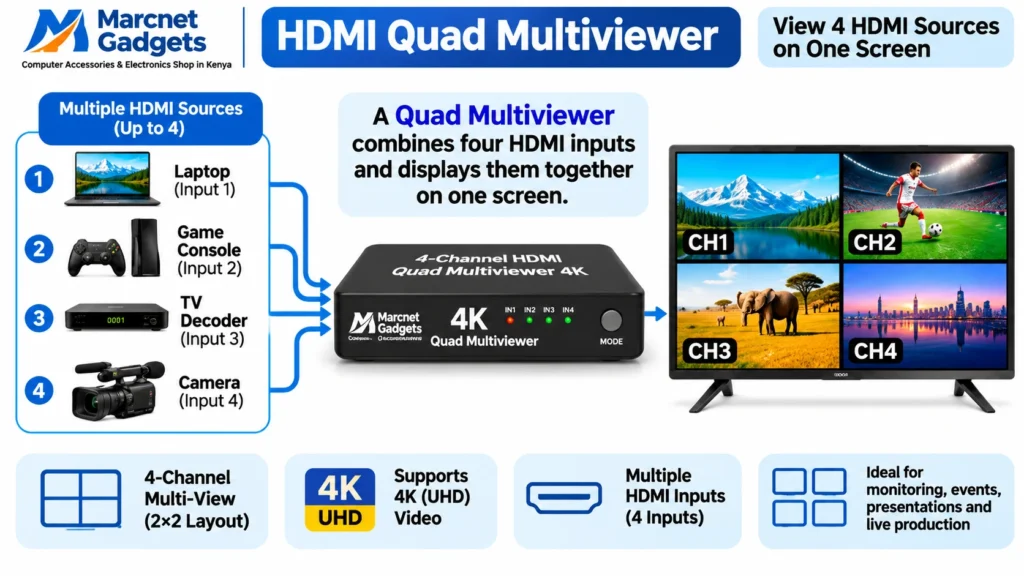
Related Marcnet Product
Consider this product family when your requirement is to view multiple HDMI sources through one display rather than route them to several independent screens.
Confirm the available layouts, supported input/output formats and viewing modes before purchasing.
6. HDMI Matrix vs Video Wall Controller
A video wall controller is another specialized type of display equipment.
An ordinary HDMI matrix focuses on routing video sources.
A video wall controller may provide video processing functions designed to divide, scale or arrange images across a multi-screen display installation.
These capabilities are not necessarily available in a conventional HDMI matrix.
If your goal is to build a large display wall from several monitors, evaluate the video wall controller specifications rather than assuming an HDMI splitter or matrix will perform the same function.
Explore HDMI Video Wall Controllers
7. Do HDMI Splitters and Switches Support 4K?
Some HDMI distribution devices support 4K resolutions, but the available formats vary between products.
A device labelled 4K does not automatically support every 4K refresh rate or display setup.
Before ordering, check:
- Maximum supported resolution.
- Refresh rate, including whether 4K at 60Hz is supported.
- HDMI version and available bandwidth.
- HDCP compatibility for protected video content.
- Supported audio formats.
- Power supply requirements.
- Connected display capabilities.
- Cable specifications and connection length.
If you connect devices with different resolution capabilities, confirm how the HDMI equipment handles display compatibility and signal negotiation.
Related buying categories:
8. HDMI Splitter vs HDMI Extender
Although both are used in HDMI installations, these devices solve different problems.
An HDMI splitter distributes one source to multiple displays.
An HDMI extender is designed to carry compatible HDMI signals across longer distances using an appropriate transmission system.
For example, a customer may need a splitter to duplicate a presentation and an HDMI extender to carry one output to a distant screen.
The required configuration depends on distance, cable type and supported video resolution.
Explore HDMI Extenders Over CAT6
9. Which HDMI Device Is Best for Your Setup?
Home Entertainment
If you have a television with limited HDMI inputs but several devices, an HDMI switch is usually the more suitable choice.
If you want one compatible media source displayed on two televisions, consider an HDMI splitter.
Office Presentations
For one laptop presenting identical content on several displays, consider a splitter.
For several laptops and multiple displays requiring independent source selection, consider an HDMI matrix.
Shops and Commercial Displays
A splitter can be useful when all displays need identical content.
A matrix provides more flexible source selection where compatible models support the required routing.
A video wall controller may be more appropriate for a display wall requiring specialized screen layouts.
Camera Monitoring and Livestreaming
For monitoring multiple compatible HDMI camera feeds on one screen, investigate an HDMI multiviewer.
For selecting camera feeds during a live production, specialist video switchers may be required.
For recording or livestreaming an HDMI camera signal to a computer, check whether a compatible capture device is necessary.
A standard HDMI switch or matrix does not automatically provide computer video capture functionality.
Explore HDMI Video Capture Cards
10. Common HDMI Buying Mistakes to Avoid
Mistake 1: Buying a splitter when you need a switch.
A splitter duplicates one source. A switch selects between multiple sources.
Mistake 2: Assuming every 4K device supports 4K at 60Hz.
Check the exact specifications rather than relying on the term 4K alone.
Mistake 3: Expecting a splitter to extend your desktop.
An ordinary splitter mirrors the source signal rather than producing independent monitor content.
Mistake 4: Confusing a matrix with a multiviewer.
A matrix routes video signals. A multiviewer is intended for viewing multiple signals within a supported output layout.
Mistake 5: Ignoring the number of HDMI ports.
Count your source devices and display outputs before deciding between 3×1, 5×1, 4×2 or other configurations.
Mistake 6: Overlooking cable distance.
Longer installations may require compatible active HDMI cables, fiber optic HDMI cables or HDMI extenders.
Mistake 7: Ignoring content-protection compatibility.
Protected content may not display correctly when connected equipment does not support the necessary HDCP requirements.
11. Buy HDMI Splitters, Switches and Matrix Devices in Kenya
Marcnet Gadgets offers HDMI connectivity and distribution equipment for customers in Nairobi and across Kenya.
Whether you need to connect one source to multiple televisions, switch between several devices or build a flexible office AV setup, the right choice depends on how many HDMI sources and displays you want to connect.
Shop by Equipment Type
Need help choosing?
Before contacting Marcnet Gadgets, identify:
- How many HDMI source devices you have.
- How many displays you want to connect.
- Whether the screens should show the same or different content.
- The required resolution and refresh rate.
- The approximate distance between devices and displays.
Providing these details makes it easier to identify the equipment that best matches your installation.
Frequently Asked Questions
What is the difference between an HDMI splitter and HDMI switch?
An HDMI splitter distributes one source to multiple displays. An HDMI switch selects one of several sources for a single output.
Can an HDMI splitter show different content on two TVs?
An ordinary HDMI splitter cannot. It generally duplicates the same video signal to both displays.
Is an HDMI matrix better than an HDMI splitter?
Not necessarily. A matrix provides more flexible routing, but a splitter is usually sufficient when several displays need identical content.
Can an HDMI switch connect three devices to one TV?
Yes. A compatible 3×1 HDMI switch is designed to select between three HDMI source inputs for one display output.
What is a 4×2 HDMI matrix?
A 4×2 HDMI matrix typically offers four source inputs and two outputs, allowing flexible routing according to the model’s capabilities.
What is the difference between a matrix and a quad multiviewer?
A matrix routes video sources to display outputs. A quad multiviewer is designed for viewing multiple source signals within a supported display layout.
Can an HDMI splitter support 4K video?
Some can. Confirm the maximum supported resolution and refresh rate on the exact product listing.
Do HDMI splitters require external power?
Some models require external power. Check the individual product’s power requirements before buying.
Can an HDMI switch work with a projector?
Yes, where the switch, projector, source device and cables support compatible HDMI formats.
Where can I buy HDMI splitters, switches and matrices in Kenya?
Browse the HDMI equipment categories at Marcnet Gadgets to compare listed products and specifications before placing an order.
Final buying advice: Choose an HDMI splitter for identical content on multiple screens, an HDMI switch for selecting between source devices, or an HDMI matrix when you need flexible routing across several displays. For multi-source monitoring or video wall layouts, compare specialist multiviewers and video wall controllers instead.