
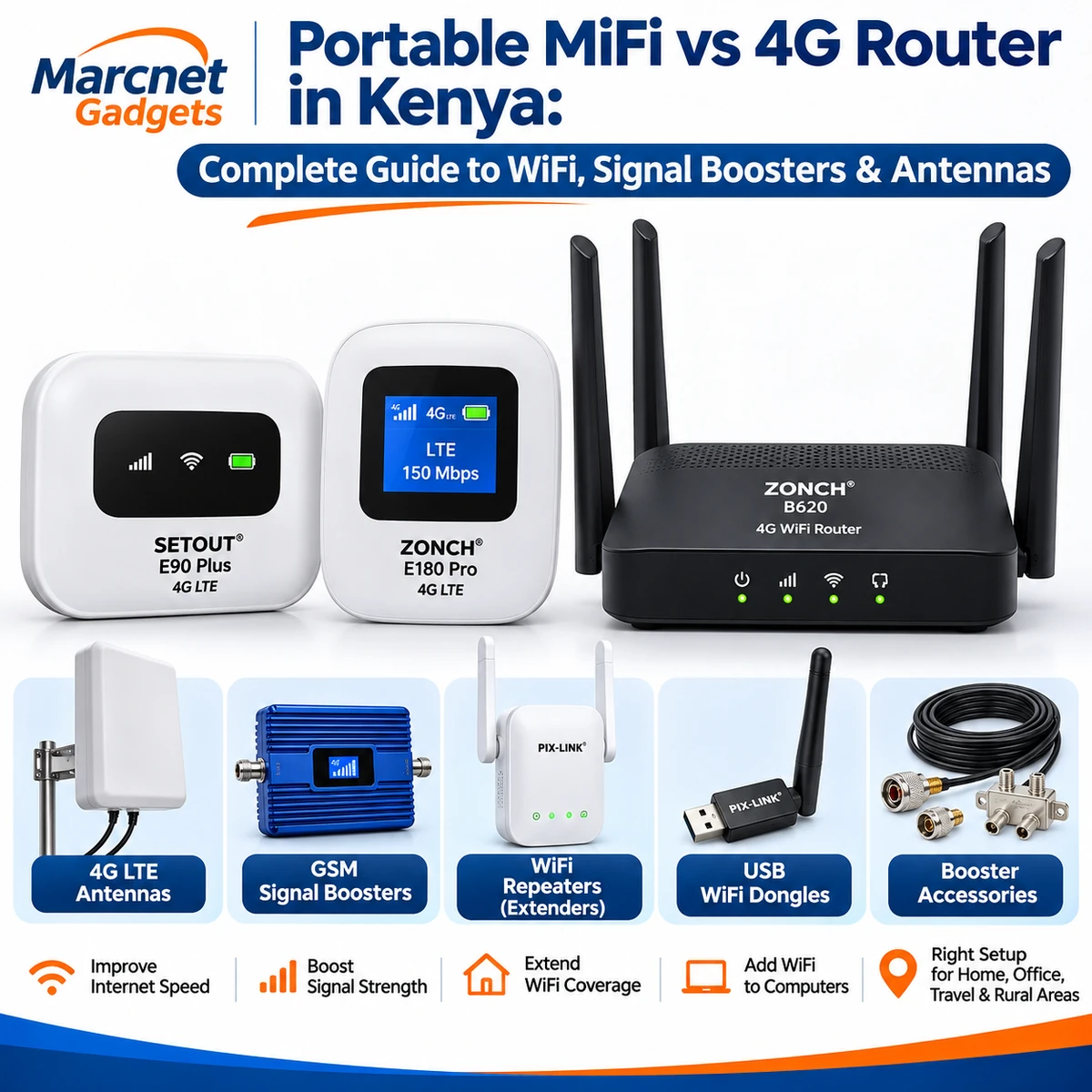
MiFi vs 4G Router in Kenya: which option is better for travel, home internet or your business? Both can turn a compatible mobile-data connection into Wi-Fi, but they serve different needs. A rechargeable MiFi is convenient for travel, while a larger SIM router may be better for a fixed home, office or shop setup. If the real problem is weak signal, a missing computer Wi-Fi connection or poor coverage in another room, a different device may be the answer.
This guide compares Marcnet Gadgets’ stocked MiFi and 4G router models, then explains when to consider LTE antennas, GSM signal boosters, Wi-Fi repeaters and USB wireless adapters. Start with the problem you want to solve—not the advertised Mbps number.
1. Quick answer: MiFi, 4G router, Wi-Fi repeater or USB dongle?
| Your problem | Product to consider | What it actually does |
|---|---|---|
| Need internet while travelling or between locations | Portable MiFi | Shares compatible SIM-based mobile data over local Wi-Fi |
| Need SIM internet in a fixed home, shop or office | 4G SIM router | Shares a compatible mobile-data connection with several Wi-Fi devices |
| 4G reception is poor at the router | Compatible external LTE antenna | May improve the router’s cellular reception when supported |
| Wi-Fi reaches the living room but not an upstairs room | Wi-Fi repeater/range extender | Relays a usable existing Wi-Fi connection |
| Desktop has no Wi-Fi, or laptop Wi-Fi is faulty | USB Wi-Fi adapter | Gives a compatible computer Wi-Fi connectivity |
| Bluetooth headphones will not pair with an older computer | USB Bluetooth adapter | Adds Bluetooth, not Wi-Fi |
| Cellular reception drops indoors across many phones | Appropriately approved GSM/cellular booster system | A specialised, frequency-matched cellular installation—not a home Wi-Fi repeater |
Browse the complete Network & Signal Amplifiers range if you are still determining which device category is suitable.
2. MiFi vs 4G Router in Kenya: Key Differences
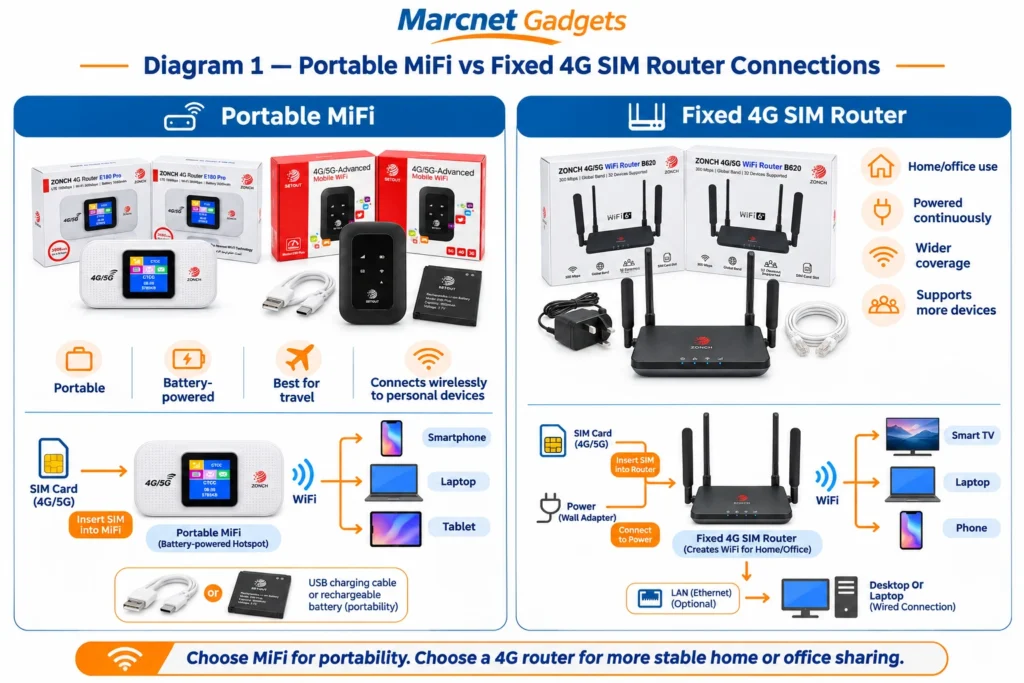
A portable MiFi combines a cellular modem with a small Wi-Fi hotspot. The stocked SETOUT E90 Plus and ZONCH E180 Pro both list rechargeable 3000mAh batteries, making them suitable to carry between locations. A compatible SIM card and usable operator signal are still needed; battery capacity does not tell you how many hours a device will run under every condition.
A 4G SIM router is generally selected for a more permanent shared internet connection. The stocked ZONCH B620 lists a 2.4GHz Wi-Fi link rate of up to 300Mbps, four external antennas and support for up to 32 connected devices. That 300Mbps refers to its advertised Wi-Fi capability, not a guaranteed 4G download speed. Check its power and SIM requirements from the exact unit before planning a fixed installation.
Neither type produces internet service by itself; the SIM plan, cellular network bands and local coverage determine whether it can connect. Neither should be confused with a Wi-Fi repeater, which typically extends an existing internet connection instead of accepting a cellular SIM.
3. Compare the three stocked Marcnet MiFi and 4G router options
| Device | Published distinguishing features | Consider it for |
|---|---|---|
| SETOUT E90 Plus | Rechargeable 3000mAh battery; advertised LTE speeds up to 150Mbps | Budget-conscious portable access with a compatible SIM |
| ZONCH E180 Pro | Rechargeable 3000mAh battery; screen; LTE Band 28 listed for the described variant | Portable use where its confirmed network bands fit the SIM |
| ZONCH B620 | 2.4GHz Wi-Fi up to an advertised 300Mbps; four antennas; up to 32 devices listed | More stationary multi-device Wi-Fi sharing |
For a student, fieldworker or frequent traveller who needs convenient battery-powered access, compare the two MiFi models first. For a shop, reception desk or household that needs several connected devices in one location, check the B620’s power arrangement and supported SIM bands. Up to 32 connected devices describes an advertised capacity, not a promise that all 32 devices will receive fast internet simultaneously.
See all three together in Portable MiFi Devices & 4G Routers.
4. Safaricom, Airtel, Faiba and Telkom SIM compatibility
Before buying any 4G device, identify the intended operator, the SIM or data plan and the LTE frequency bands available where the equipment will be used. A product described as “universal” is not automatically compatible with every frequency or every SIM configuration. SIM PIN settings, APN configuration and mobile-network coverage may also affect setup.
Marcnet’s ZONCH E180 Pro listing specifically identifies LTE Band 28, relevant to its advertised Faiba JTL compatibility. That claim applies to the listed E180 Pro variant; do not assume every other MiFi has the same bands. The SETOUT E90 Plus is listed for compatible local SIM networks, with an explicit reminder that exact frequency support matters. Check the B620 specification separately before selecting a fixed router.
Buying checklist: Ask which operator you will use, whether it provides a usable signal at the intended address, what bands are required, whether the router is SIM-unlocked, and what charger or power source it needs. An advertised maximum LTE rate is not a speed guarantee; actual performance depends on signal, capacity, congestion and data plan.
5. Mobile signal versus Wi-Fi signal: diagnose before buying
These are different links in the same setup:
- Cellular link: Network tower → 4G MiFi or SIM router. Poor cellular coverage can cause slow internet even when your laptop shows full Wi-Fi bars.
- Local Wi-Fi link: Router or MiFi → laptop, phone or smart TV. Weak Wi-Fi in another room can make an otherwise adequate 4G connection feel unreliable.
- Computer adapter: A desktop or laptop needs a working Wi-Fi adapter, even if the building has strong wireless coverage.
Test close to the router and, where practical, compare with a device near a window or another suitable location. If performance improves significantly nearer the router but the cellular connection remains stable, a Wi-Fi network extender may help. If the router itself has poor cellular reception, an approved installation using a compatible LTE antenna may be worth evaluating instead.
6. When can a 4G LTE external antenna help?
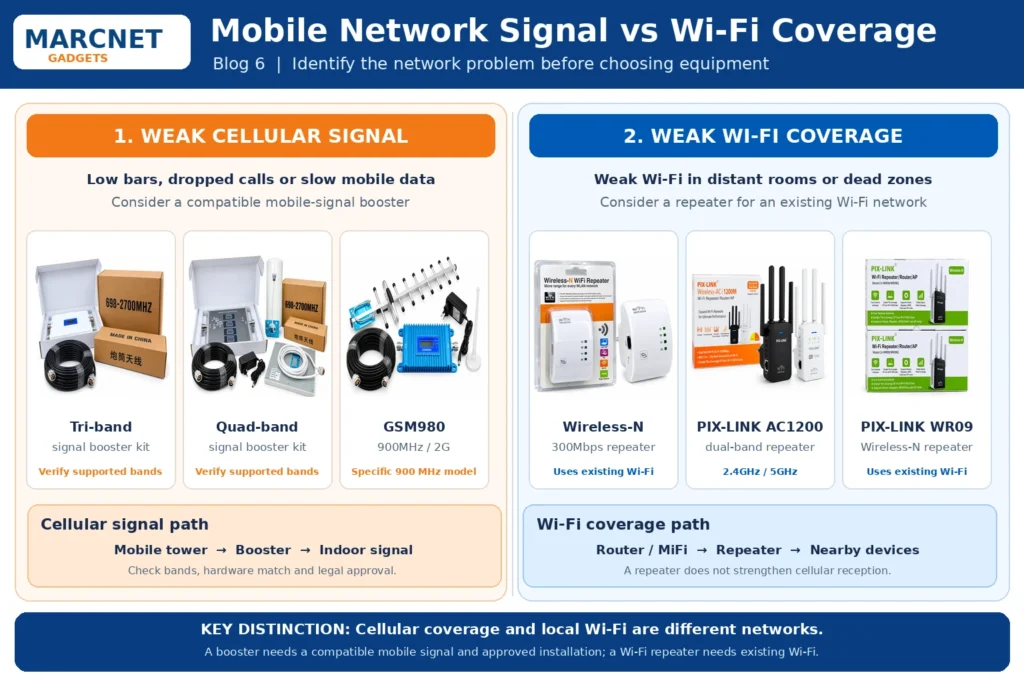
An external LTE antenna can potentially improve reception only when the router or modem supports the relevant external antenna connection. Match the LTE bands, connector type (such as SMA), port arrangement, cable length and location. An antenna cannot create signal where no usable cellular signal exists, and long coaxial cables introduce signal loss.
Marcnet’s related LTE antenna options include:
- 12dBi Outdoor 4G LTE Antenna, Dual 5m SMA, intended for compatible dual-antenna router installations. Verify the router really has matching ports; a MiFi with no external antenna connector cannot use it directly.
- 4G LTE Router Antenna, 10m SMA Cable, a magnetic-base option with a listed 10m cable for suitable SMA connections. Positioning and cable losses matter.
- SMA External 4G LTE Router Antenna, another SMA external antenna option. Reference to Huawei or ZTE-compatible equipment does not mean it fits every model from those brands.
Choose an antenna only after checking the actual router’s external antenna ports and frequencies. If the device has no supported connector, consider choosing a router with the required capability rather than purchasing incompatible accessories.
7. GSM signal boosters: a different problem and a regulated installation
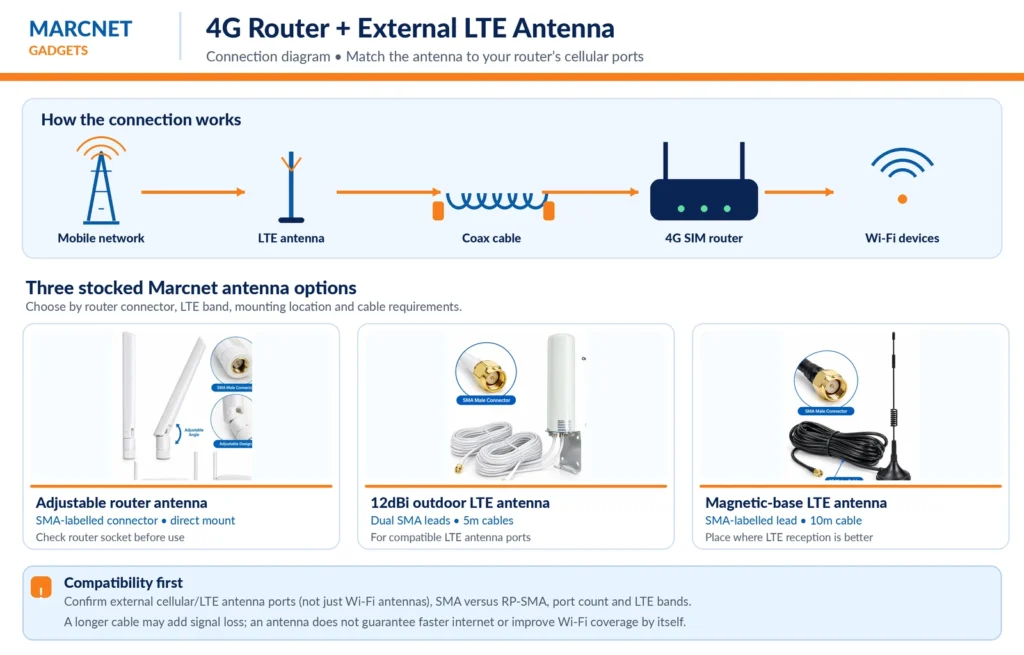
A cellular signal booster/repeater differs from a Wi-Fi range extender. It works with licensed mobile-radio frequencies and normally needs a suitable outdoor donor signal, correctly matched antennas and cabling, suitable separation between antennas and a compliant repeater unit. A Wi-Fi repeater merely extends a Wi-Fi network.
Marcnet lists three different booster systems:
- GSM980 900MHz 2G Signal Booster Kit: a 900MHz GSM/2G kit, not a general 4G internet improvement solution.
- Tri-Band 900/1800/2100MHz GSM Booster Kit: listed for specified 900/1800/2100MHz applications. The intended cellular service must use compatible bands.
- Quad-Band GSM Signal Booster Full Kit: described by the listing as a multi-band 2G/3G/4G/5G kit. Verify the exact supported frequency bands and cellular services before making any 5G coverage claim; the label alone is insufficient.
Kenya compliance: The Communications Authority of Kenya sets type-approval requirements for communications equipment and technical conditions for static mobile-signal repeaters. Do not assume that a listed or imported booster model is type-approved. Before purchase or installation, request the exact model’s applicable CA type-approval evidence and use a qualified installer who can verify network bands, safe operation and interference controls. See the Communications Authority of Kenya’s type approval information.
Explore the GSM Signal Boosters collection only when the problem is genuinely cellular signal reception, rather than ordinary Wi-Fi coverage.
8. Choosing booster antennas, splitters and RF connectors
For a properly specified cellular booster system, the accessories matter as much as the repeater. Marcnet’s GSM Booster Accessories group includes:
- Outdoor antennas: 12dBi 698–2700MHz Outdoor GSM Antenna, 18dBi 698–2700MHz Outdoor GSM Antenna and the directional Outdoor Yagi Antenna for GSM Booster. Frequency match, gain, orientation and physical placement matter; a higher dBi number by itself does not guarantee better indoor results.
- Indoor coverage: 7dBi Indoor GSM Booster Antenna for compatible indoor distribution.
- Multiple indoor feeds: 2-Way GSM RF Splitter, N-Female and 4-Way GSM RF Splitter, N-Female. Splitters divide the available RF signal and introduce loss; do not assume four outputs mean four times the signal.
- Cable/connector matching: F-to-N RG6 Connector and N-Female to N-Female Coax Coupler. Match connector gender, impedance and the approved system design.
A typical correctly designed system may involve an outdoor antenna, coaxial cable, approved repeater, a suitably placed indoor antenna and compatible RF accessories. It is not appropriate to recommend mixing parts based only on their physical appearance.
9. Wi-Fi repeaters: extending coverage in homes and offices
If internet works near the main router but Wi-Fi fades upstairs or behind thick walls, a Wi-Fi repeater is a more relevant product than a cellular GSM booster. It must receive an existing usable Wi-Fi signal. Install it between the main router and the weak-coverage area—not at the dead spot where the original signal is already unusable.
The three Marcnet options cover different wireless needs:
- PIX-LINK AC1200 Dual-Band Wi-Fi Repeater: listed with 2.4GHz and 5GHz support and repeater, router and access-point modes. The AC1200 label refers to advertised combined wireless capability, not a guaranteed broadband speed.
- PIX-LINK WR09 300Mbps Wireless-N Repeater: a Wireless-N option with four antennas; check its supported operating modes for your installation.
- 300Mbps Wireless-N 2.4GHz Wi-Fi Repeater: a 2.4GHz-focused option for compatible existing networks.
A wired access point can be preferable where reliable Ethernet cabling is available. Extenders may improve reach but may also introduce throughput penalties, depending on placement and how the backhaul operates. Shop the network extender range and verify the existing router’s Wi-Fi bands before selecting a device.
10. USB Wi-Fi dongles for desktop and laptop networking
Some computers have no built-in Wi-Fi or have a failed or outdated wireless adapter. A USB Wi-Fi dongle connects the computer to a compatible existing Wi-Fi network; it does not provide independent SIM-based mobile internet.
Marcnet has four Wi-Fi-capable choices in its broader USB adapter category:
- 300Mbps 802.11n USB Wi-Fi Dongle: for compatible 802.11n wireless networks.
- 300Mbps USB Wi-Fi Adapter with Antenna: a Wireless-N design with an external antenna.
- PIX-LINK AC600 Dual-Band USB Wi-Fi Adapter: listed with 2.4GHz and 5GHz Wi-Fi for compatible networks and computers.
- 2-in-1 Wi-Fi + Bluetooth 4.2 USB Dongle: provides listed 2.4GHz Wi-Fi and Bluetooth 4.2 capabilities in one adapter.
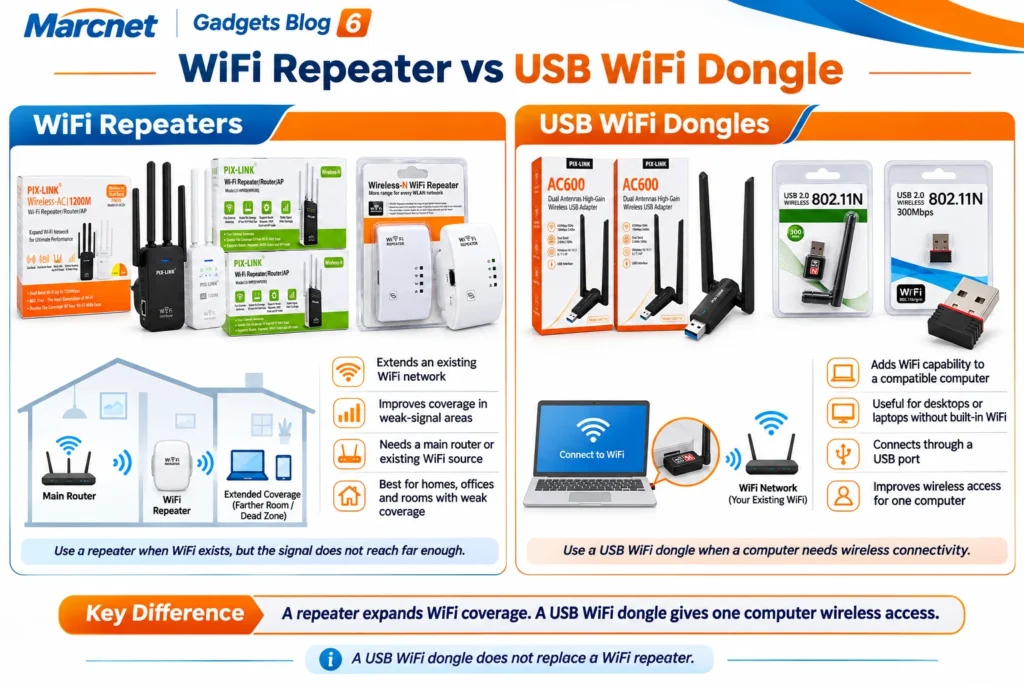
Wi-Fi Repeater vs USB Wi-Fi Dongle: Which One Do You Need?
Check the computer’s USB port, Windows/Linux/macOS version as applicable, chipset driver availability and the Wi-Fi band supported by the router. “300Mbps” or “AC600” is a wireless link classification, not a guaranteed internet speed.
Choose a Wi-Fi repeater when your router already provides Wi-Fi, but the signal is weak in another room or part of the building. Choose a USB Wi-Fi dongle when a particular desktop or laptop cannot connect to an available Wi-Fi network because it has no working or compatible wireless adapter.
| Compare | Wi-Fi repeater | USB Wi-Fi dongle |
|---|---|---|
| Problem addressed | Weak Wi-Fi coverage across rooms | Missing or faulty Wi-Fi on one computer |
| Where it connects | To an existing Wi-Fi network; positioning and setup are required | To a compatible computer USB port |
| Who benefits | Multiple devices in a weak-coverage area | The computer using the adapter |
| Does it create internet service? | No | No |
The comparison shows why a Wi-Fi repeater is not a replacement for a USB Wi-Fi dongle. Verify existing network coverage, computer compatibility and supported Wi-Fi bands before buying.
11. Bluetooth adapters are not Wi-Fi adapters
The category also lists a Bluetooth 5.0 USB Dongle (Bluetooth-only). It can be appropriate for compatible Bluetooth headphones, speakers, keyboards, mice and other supported peripherals—but it is not a Wi-Fi dongle and will not connect a PC to a wireless router for internet access.
This distinction matters because both products may look like small USB sticks. When buying, identify whether you need internet over Wi-Fi, Bluetooth peripheral pairing, or a combined adapter. Browse the USB adapter category with that purpose in mind.
12. Which device should you buy? Real-world Kenya scenarios
| Scenario | Start with | Before ordering |
|---|---|---|
| Student travelling between home, college and work | Battery-powered MiFi | Compare battery, SIM band support and coverage |
| Shop sharing a SIM connection across phones and POS equipment | 4G SIM router | Check reliability, power, SIM plan and device load |
| Rural house with weak outdoor LTE signal | Compatible router and external LTE antenna | Confirm usable donor signal and supported antenna ports |
| Office with weak cellular reception indoors but better outside | Properly specified and CA-compliant booster installation | Verify exact mobile bands, type approval and qualified installer |
| House with Wi-Fi dead zones | Wi-Fi repeater or wired access point | Check source Wi-Fi signal, 2.4/5GHz needs and placement |
| Desktop without wireless internet | USB Wi-Fi adapter | Match USB, operating system and router band |
| Desktop needing wireless Bluetooth audio | USB Bluetooth adapter | Confirm supported profiles and drivers |
A device that solves the correct problem often matters more than a larger antenna, a higher advertised Mbps number or a long list of wireless marketing labels.
13. Basic setup and troubleshooting checks
- For MiFi/4G routers: Insert a compatible activated SIM, check PIN and APN requirements, confirm supported LTE bands and test in a location with usable network coverage.
- For unstable mobile internet: Compare signal and performance in more than one location. Do not assume Wi-Fi bars measure the cellular tower signal.
- For external LTE antennas: Check the router’s actual antenna ports before purchase; verify connector type, installation position and cable losses.
- For Wi-Fi repeaters: Place the extender where it still receives a usable router signal and follow its model-specific pairing/setup instructions.
- For USB Wi-Fi adapters: Confirm supported operating systems, install the appropriate driver if required and check the adapter appears in your computer’s network settings.
- For GSM boosters: Do not self-install an unverified repeater. Confirm equipment approval, compatible frequencies and a properly designed installation.
If an installation is still unclear, send Marcnet the router model, SIM operator, problem description, intended location and photos of the relevant ports. That information is more reliable than guessing from an antenna’s appearance.
14. Frequently asked questions
Is MiFi better than a 4G router?
It depends on the use. Portable MiFi devices are convenient when battery-powered mobility matters; a larger SIM router is often more appropriate for a fixed multi-device setup. Verify the exact model’s SIM bands, power and supported connections.
Will a MiFi work with Safaricom, Airtel, Telkom or Faiba?
Only where the specific model and variant support the required LTE bands and SIM configuration. The ZONCH E180 Pro listing identifies Band 28 support, but that does not establish compatibility for every other MiFi.
Can I put an external antenna on any 4G MiFi?
No. The MiFi or router must have a supported external antenna connection, and the antenna must match its bands, connectors and port configuration.
Does a Wi-Fi repeater boost 4G network signal?
No. It extends an existing Wi-Fi network. If the 4G connection to the router is weak, extending Wi-Fi alone will not fix the underlying cellular link.
What is the difference between 300Mbps Wi-Fi and 150Mbps LTE?
They are rates for different links. Wi-Fi speed describes local wireless capability; LTE download speed describes the cellular data link. Actual internet performance will usually be limited by the weakest relevant part of the connection.
Is a GSM booster legal to use in Kenya?
Kenyan communications equipment is subject to the Communications Authority’s type-approval rules. Check the specific booster model’s applicable approval, required bands and installation conditions before buying or using it. A store listing by itself does not confirm approval.
Can a USB Wi-Fi dongle replace faulty laptop Wi-Fi?
Often, yes, provided the USB adapter supports the laptop’s operating system, has suitable drivers and is compatible with the existing wireless network.
Does a USB Bluetooth dongle provide Wi-Fi internet?
No. A Bluetooth-only adapter is for supported Bluetooth peripherals. Choose a Wi-Fi adapter or a combined Wi-Fi/Bluetooth device if the computer needs Wi-Fi networking.
15. Shop network and signal products in Kenya at Marcnet Gadgets
Marcnet Gadgets provides portable MiFi and SIM routers, LTE antennas, Wi-Fi repeaters, USB Wi-Fi adapters, cellular booster kits and matching RF accessories for customers in Nairobi and across Kenya.
For a more confident purchase, begin with the connectivity problem, exact device model, SIM/network and location. Browse the Network & Signal Amplifiers range or contact Marcnet Gadgets for product suitability and availability information. Verify prices, stock, coverage and technical compatibility at the time of ordering.
Leave a Reply