
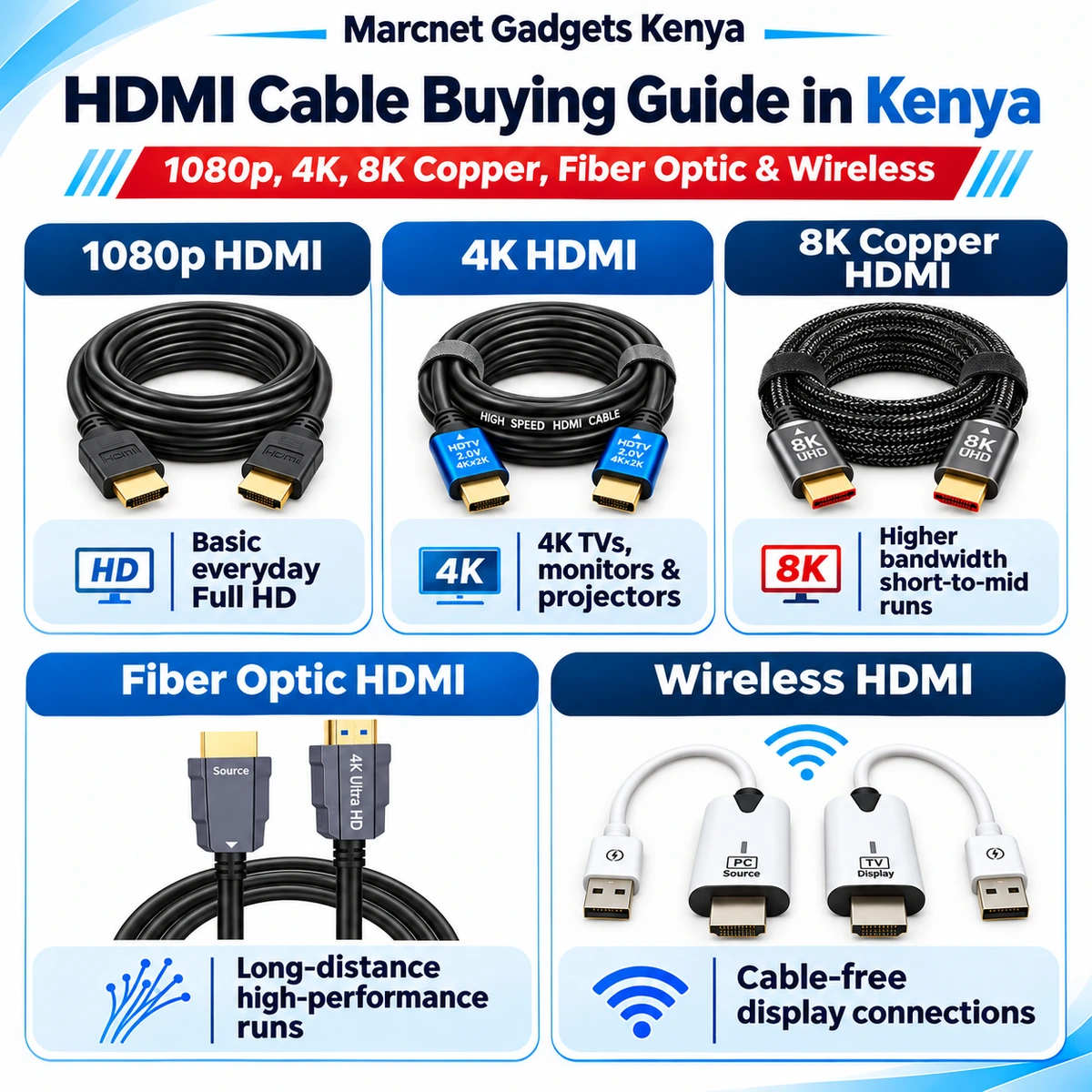
Choosing the right HDMI cable is about more than resolution. Cable length, bandwidth, construction and installation conditions all matter.
Whether you are connecting a laptop to a monitor, a decoder to a television, a projector across a meeting room or a display several metres away, choosing a suitable HDMI cable can help you avoid unnecessary costs and connection problems.
At Marcnet Gadgets Kenya, customers can choose from Full HD 1080p, 4K, 8K copper and active optical fiber HDMI cables in different lengths.
This guide explains how these options compare, which specifications matter and when wireless HDMI may be worth considering.
Explore HDMI Cables & Accessories at Marcnet Gadgets
1. HDMI Cable Types: 1080p vs 4K vs 8K vs Fiber Optic
HDMI carries digital video and audio between compatible devices. However, not every cable is designed for the same bandwidth, length or application.
Before buying, understand these four product groups.
| HDMI cable type | Main buying consideration | Common application |
|---|---|---|
| 1080p / Full HD | Standard Full HD video connections | TVs, laptops, monitors and projectors |
| 4K HDMI | Higher-resolution video, with refresh rate checked separately | 4K TVs, monitors and presentation equipment |
| 8K copper HDMI | Higher-bandwidth video connections | Compatible 8K and demanding 4K equipment |
| Active optical fiber HDMI | Video transmission over longer cable routes | Meeting rooms, projectors and commercial installations |
Important: These categories are not completely separate technical standards.
1080p, 4K and 8K describe video resolutions. Copper and fiber optic describe the transmission technology used inside the cable.
A copper HDMI cable can support different resolutions depending on its construction and performance. Similarly, fiber optic HDMI cables may be designed for 4K or 8K applications.
Does a more expensive HDMI cable give a better picture?
Not automatically.
If a suitable HDMI cable is already transmitting the required digital video signal reliably, buying a more expensive cable does not necessarily make the picture sharper.
A higher-performance cable becomes valuable when your devices require additional bandwidth, higher refresh rates, supported HDMI features or a more demanding installation distance.
Buying rule: Match the cable to the equipment and installation requirements—not just the highest resolution printed on the packaging.
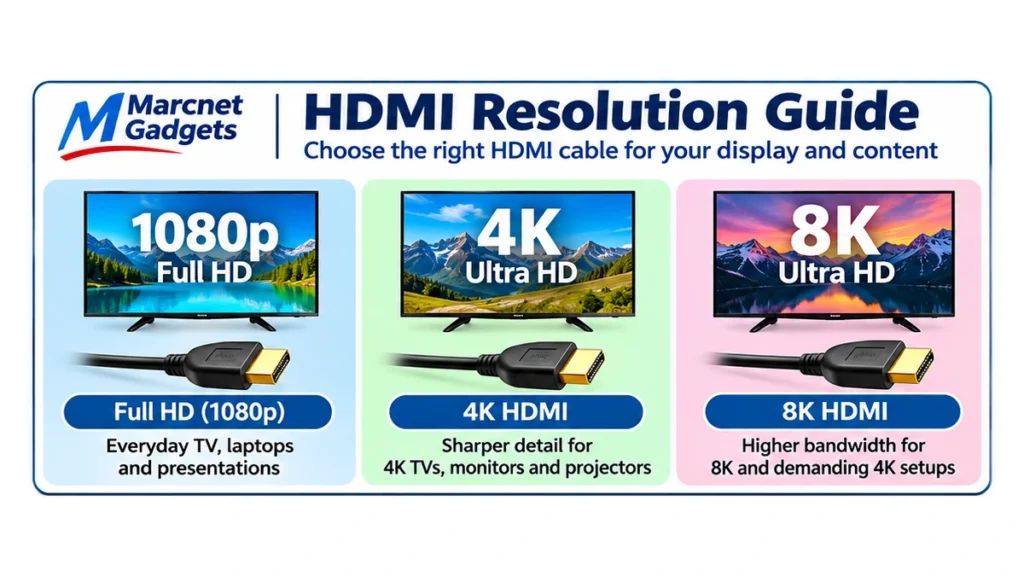
2. When Should You Buy a 1080p HDMI Cable?
A Full HD HDMI cable is a practical choice for compatible equipment using 1080p video.
Common applications include:
- Connecting a laptop to a Full HD monitor.
- Connecting a media player or decoder to a television.
- Sending presentations to a compatible projector.
- Connecting computers and displays in an office.
- Setting up basic home entertainment equipment.
The required cable length depends on the distance and actual route between your devices.
Marcnet Gadgets 1080p HDMI Cable Options
| Cable length | Available product | Suggested use |
|---|---|---|
| 1.5m | HDMI Male-to-Male Cable 1.5m | Nearby devices |
| 3m | 3m HDMI Male-to-Male Cable 1080p | TV and computer connections |
| 5m | 5m HDMI Male-to-Male Cable 1080p | Wider room arrangements |
| 10m | 10m HDMI 1.4 Full HD Cable | Extended room connections |
| 15m | 15m Full HD 1080p HDMI Cable | Longer cable routes |
| 20m | 20m HDMI 1.4 Full HD Cable | Longer installations |
| 30m | 30m Full HD 1080p HDMI Cable | Extended display connections |
Which length should you choose?
For nearby devices, a 1.5m or 3m cable may be sufficient.
For televisions or projectors located farther away, customers may need 5m, 10m or longer cables.
Longer HDMI cables require more attention to signal compatibility and installation conditions. A cable being available in a 20m or 30m length does not guarantee that every source and display combination will work correctly.
Buying tip: Measure the actual route, including furniture, corners and equipment placement. Select a suitable length and confirm the signal requirements before installation.
Shop 1080p HDMI Cables in Kenya
3. When Should You Upgrade to a 4K HDMI Cable?
A 4K HDMI cable is relevant when your television, monitor, projector or other display equipment supports 4K video.
Customers commonly choose 4K HDMI cables for:
- 4K televisions and compatible media players.
- Computers connected to UHD monitors.
- Office presentations using 4K displays.
- Commercial display installations.
- Compatible gaming and entertainment systems.
However, not every cable advertised as 4K supports the same refresh rate or signal format.
Understanding 4K at 30Hz and 4K at 60Hz
The refresh rate describes how many times a display can update its image each second.
For example:
4K at 30Hz may be suitable for certain presentation and video applications.
4K at 60Hz provides more frequent image updates and can be desirable for compatible computers, gaming systems and smoother motion.
Whether a cable supports a particular format depends on its bandwidth capabilities and the requirements of the connected equipment.
Official Premium High Speed HDMI certification is associated with performance up to 18Gbps, including supported 4K60 applications. A product must have appropriate certification evidence before it can be described as officially certified.
Marcnet Gadgets 4K HDMI Cable Options
| Length / type | Product | Main buying consideration |
|---|---|---|
| 1.5m | 1.5m 4K HDMI Cable 60Hz | Short 4K connections |
| 2–4m spiral | HDMI Spiral Cable 4K 60Hz | Coiled, flexible installations |
| 3m | 3m 4K HDMI Cable | Home and office use |
| 5m | 5m 4K HDMI Cable 18Gbps | Wider room connections |
| 10m | 10m HDMI 2.0 Cable 4K 60Hz | Longer 4K connections |
| 15m | 15m 4K HDMI Cable | Extended installations |
| 20m | 20m 4K High Speed HDMI Cable | Long HDMI cable routes |
| 30m | 30m 4K High Speed HDMI Cable | Longer commercial connections |
All these products are classified within Marcnet’s 4K HDMI range.
Specific refresh-rate and bandwidth capabilities vary by product.
What makes a spiral HDMI cable different?
A spiral HDMI cable uses a coiled design that can extend and retract when connecting devices.
This can help manage excess cable around suitable equipment setups.
Marcnet’s 2–4m HDMI Spiral Cable supports 4K at 60Hz, as confirmed in the product specifications.
However, the supported 4K60 signal formats should still be considered when choosing it for a particular source and display. Resolution and refresh rate alone do not establish compatibility with every colour format or HDMI feature.
Can longer 4K HDMI cables work reliably?
Marcnet offers 4K HDMI cables in 15m, 20m and 30m lengths.
These can be considered for longer installations, subject to the supported signal formats and the actual equipment being connected.
For demanding longer-distance installations, customers should also compare active optical fiber HDMI cables.
Browse 4K HDMI Cables at Marcnet Gadgets
4. What Is an 8K Copper HDMI Cable?
An 8K HDMI cable is designed for higher-bandwidth HDMI applications, depending on its specifications.
Higher-bandwidth connections may be relevant for supported 8K video formats and demanding 4K configurations requiring higher refresh rates or additional features.
But an 8K cable is not necessary for every television or computer.
Marcnet Gadgets 8K Copper HDMI Cables
Marcnet has two copper-conductor HDMI products with confirmed 48Gbps and 8K at 60Hz specifications.
HDMI 2.1 8K Copper Cable 10m — 48Gbps, 8K60
This 10m copper HDMI cable supports the stated 48Gbps bandwidth and 8K at 60Hz specification.
It is intended for compatible higher-bandwidth HDMI connections where a 10m cable route is required.
HDMI 2.1 8K Copper Cable 20m — 48Gbps, 8K60
This 20m copper HDMI cable also supports the confirmed 48Gbps and 8K at 60Hz specification.
It provides a longer copper-cable option for compatible installations.
Both are copper HDMI cables, not fiber optic models.
Does 48Gbps mean a cable is officially certified?
Not automatically.
A manufacturer’s stated 48Gbps specification and official Ultra High Speed HDMI certification are related but distinct claims.
Ultra High Speed HDMI is a recognized certification category for high-bandwidth HDMI cables. Customers should look for authentic certification information if official certification is important for their installation.
When should you choose an 8K cable?
Consider an 8K-capable cable when:
- Your connected equipment requires the stated higher bandwidth.
- Your display and source support compatible 8K video.
- Your 4K setup requires more demanding formats than a lower-bandwidth cable supports.
- You want a connection appropriate for equipment with compatible higher-bandwidth requirements.
Buying advice: Confirm the source, display, cable specifications and required length together.
5. Copper vs Fiber Optic HDMI Cables: What Is the Difference?
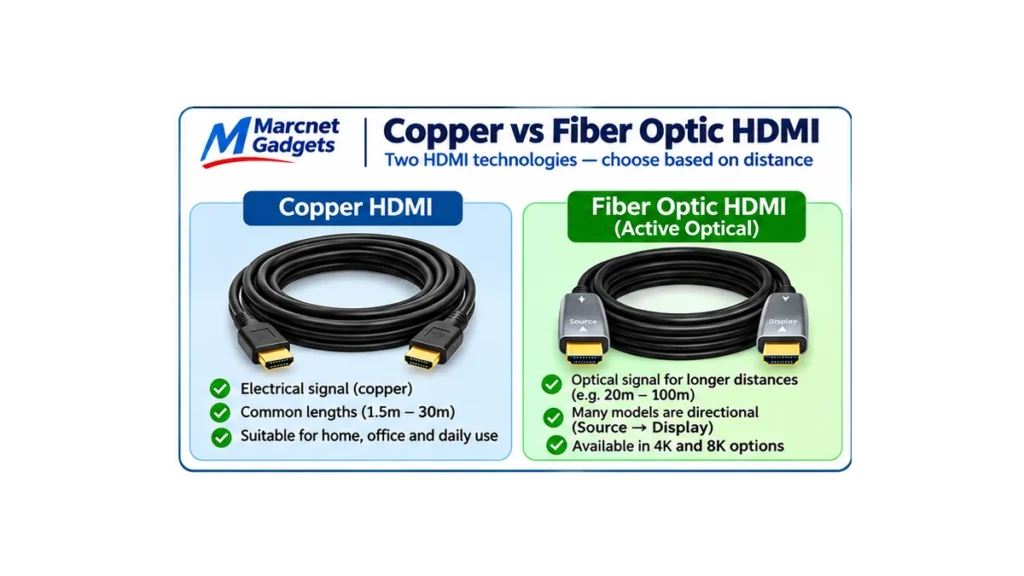
Copper HDMI cables and active optical fiber HDMI cables can both connect compatible HDMI devices, but they use different transmission methods.
Copper HDMI cables
Copper HDMI cables use electrical conductors to carry HDMI signals.
They are common in home entertainment systems, computer setups and many office installations.
Suitable copper cables can also serve longer connections when their design and specifications support the required signal.
Active optical fiber HDMI cables
Active optical fiber HDMI cables use optical transmission for supported signals, together with built-in electronic conversion components.
They are particularly relevant for certain longer-distance installations.
Copper vs Fiber HDMI Comparison
| Feature | Copper HDMI | Active Optical HDMI |
|---|---|---|
| Main transmission method | Electrical | Optical with active electronics |
| Typical buying consideration | Signal bandwidth and cable length | Long-distance signal requirements |
| Available resolutions | Model-dependent | Model-dependent |
| Directional connectors | Usually no | Many models are directional |
| Power requirements | Cable-dependent | Active electronics may need power |
| Installation considerations | Cable route and signal compatibility | Cable route, direction, power and bending |
Important: Fiber optic HDMI does not automatically mean 8K.
A 100m fiber HDMI cable may support 4K, while a shorter 20m or 30m model may be designed for 8K.
The actual product specification determines which video signals are supported.
6. Fiber Optic HDMI Cables for Long-Distance Installations
Active optical HDMI cables can be useful for installations involving projectors, meeting rooms, exhibition areas and commercial displays located farther from the source.
Marcnet Gadgets offers active optical HDMI products in lengths from 20m to 100m.
Marcnet Fiber Optic HDMI Cable Comparison
| Length | Product | Confirmed catalogue specification |
|---|---|---|
| 20m | 20m Active Optical HDMI Cable | 8K, 48Gbps |
| 30m | 30m Active Optical HDMI Cable | 8K, 48Gbps |
| 40m | 40m Active Optical HDMI Cable | 8K, 48Gbps |
| 50m | 50m Active Optical HDMI Cable | 4K Ultra HD |
| 100m | 100m Active Optical HDMI Cable | 4K, 18Gbps, HDCP 2.2 |
The key lesson is that greater cable length does not necessarily mean greater video capability.
Choose the model that meets your required resolution, refresh rate and installation distance.
Are fiber optic HDMI cables directional?
Many active optical HDMI cables are directional.
Their connectors may be labelled:
SOURCE → DISPLAY
The source connector attaches to the video-output device, while the display connector attaches to the receiving screen or compatible equipment.
For a directional model, connecting the ends incorrectly may prevent video from displaying.
Tips before installing a long fiber HDMI cable
- Identify the source and display ends.
- Check the required resolution and refresh rate.
- Confirm whether the cable requires additional power.
- Test it with the actual devices before installation.
- Avoid sharp bends, excessive pulling and connector strain.
- Allow adequate clearance when routing through conduits or ceilings.
Testing before permanent installation can prevent expensive corrections later.
Explore Fiber Optic HDMI Cables
7. How to Choose the Correct HDMI Cable Length
Choosing HDMI cable length involves more than measuring the shortest distance between devices.
Consider the actual installation route.
For example, a television might be only three metres from a decoder, but the cable may need to travel behind furniture or around the room.
Practical Buying Comparison
| Installation | What to consider |
|---|---|
| Laptop beside a monitor | Suitable short HDMI cable |
| Television and decoder | Resolution and required cable route |
| Computer connected to a 4K display | Supported 4K format and refresh rate |
| Projector across a meeting room | Length and high-bandwidth requirements |
| Long commercial display connection | Conventional versus active optical HDMI |
| Difficult cable route | Fiber or a compatible wireless HDMI alternative |
Is there a maximum distance for HDMI?
There is no single guaranteed maximum cable length that applies to every HDMI format and product.
Supported distance depends on cable construction, video bandwidth, the source, the display and other installation conditions.
This is why a 30m Full HD cable, a 30m 4K cable and a 30m 8K active optical cable should not be treated as interchangeable products.
Buying tip: Choose the cable by the combination of supported signal format and required installation length.
8. Choosing HDMI Cables for Different Applications
Home TVs and Entertainment Systems
A suitable Full HD or 4K HDMI cable may be enough for connecting televisions, decoders and media players.
Check the source and television specifications before selecting the cable.
Computers and Monitors
For a compatible computer and 4K monitor, pay particular attention to resolution, refresh rate and the relevant output capabilities.
Not all computers and monitors support the same HDMI formats.
Projectors and Conference Rooms
Projector installations often require longer cable routes.
Where a long conventional HDMI cable is unsuitable for the required signal, compare an active optical fiber HDMI model.
Business and Commercial Displays
For commercial installations, consider equipment location, cable access, installation distance and maintenance requirements.
If several displays need to show the same content or different video sources, an HDMI splitter, switch or matrix may be required in addition to the cables.
Marcnet also provides HDMI distribution equipment for these applications.
What about camera HDMI cables?
Some cameras use Mini HDMI or Micro HDMI rather than full-size HDMI connectors.
Those connections require different cable or adapter choices, particularly when connecting cameras to capture cards and livestreaming equipment.
Camera HDMI connectors, specialized camera cables and capture cards will be covered in a separate Marcnet Gadgets buying guide to keep this article focused on general HDMI cable selection.
9. When Should You Consider Wireless HDMI Instead of a Cable?
Wireless HDMI offers an alternative for situations where running a long physical HDMI cable is inconvenient.
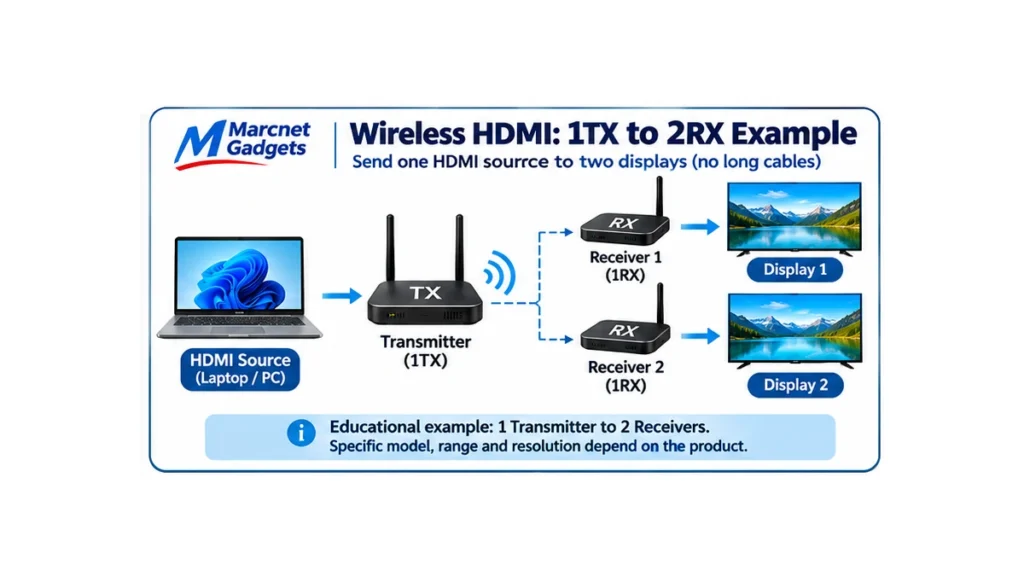
A wireless system typically includes a transmitter connected to the HDMI source and a receiver connected to a compatible display.
Potential applications include:
- Temporary presentation setups.
- Meeting rooms where cable routing is difficult.
- Selected home entertainment installations.
- Event and exhibition displays.
- Compatible multi-receiver display arrangements.
However, wireless HDMI is not automatically an upgrade in picture quality or performance.
Customers should compare supported resolution, operating range, latency, obstacles and receiver configuration.
Marcnet Gadgets Wireless HDMI Options
| Product | Advertised configuration |
|---|---|
| 30m Wireless HDMI Extender | 30m wireless connection |
| 50m Wireless HDMI Extender — USB-C Powered | 50m, USB-C powered |
| 50m Wireless HDMI 1TX to 4RX | Full HD 1080p multi-receiver configuration |
| 150m 4K Wireless HDMI Extender | Advertised 150m and 4K |
| 200m Wireless HDMI Extender | Advertised 200m, dual antenna |
Advertised wireless distances should not be treated as guaranteed indoor operating ranges. Actual performance depends on the installation environment.
The number of receivers supported by a system should also be distinguished from the number included in a particular product package.
What Is a 1TX-to-2RX Wireless HDMI System?
A 1TX-to-2RX wireless HDMI system uses one transmitter and two compatible receivers.
In a typical configuration:
One HDMI source → One wireless transmitter → Two receivers → Two displays
Both displays can receive the same transmitted video source, subject to the system’s supported operation.
This may be useful when:
- One laptop presentation needs to appear on two displays.
- A shop needs to show the same source on separate screens.
- An installation would otherwise require two long cable routes.
New product information: Marcnet Gadgets is considering a 1TX-to-2RX wireless HDMI product that has not yet been added to the website. This explanation is educational and does not represent a current online product offer.
The specific model’s resolution, wireless range, price and availability will be provided once its product listing is prepared.
For currently listed wireless options, visit:
Wireless HDMI Transmitters & Receivers at Marcnet Gadgets
10. Common HDMI Cable Buying Mistakes to Avoid
Mistake 1: Choosing a cable based only on the 4K or 8K label
Resolution is important, but supported refresh rate, bandwidth and length also matter.
Mistake 2: Assuming all 4K cables support every 4K format
Some HDMI signals require more bandwidth than others. Confirm the required format and the specific product capabilities.
Mistake 3: Buying an unnecessarily long cable
Longer cables can introduce additional installation and signal considerations. Measure the intended route and select a suitable length.
Mistake 4: Assuming every fiber optic HDMI cable supports 8K
Fiber optic cables can be designed for different resolutions and bandwidths. Confirm the exact model specifications.
Mistake 5: Connecting a directional optical HDMI cable backwards
Check the SOURCE and DISPLAY markings before installation.
Mistake 6: Expecting wireless HDMI to perform identically to a cable
Wireless performance depends on the equipment, environment and operating conditions.
Mistake 7: Buying a cable when a distribution device is needed
A regular HDMI cable connects devices. If you need to duplicate a signal, select between multiple sources or route sources to different displays, additional equipment may be required.
11. Buy HDMI Cables in Kenya at Marcnet Gadgets
Marcnet Gadgets offers HDMI connectivity products for home entertainment, offices, projectors, computer displays and commercial installations.
The best cable is not necessarily the longest or highest-resolution model.
Choose according to your equipment, the signal you want to transmit and the distance involved.
Shop HDMI Products by Category
- 1080p HDMI Cables — Full HD connections.
- 4K HDMI Cables — UHD video connections.
- 8K HDMI Cables — Higher-bandwidth HDMI equipment.
- Fiber Optic HDMI Cables — Suitable longer-distance connections.
- Wireless HDMI Systems — Cable-free connection alternatives.
Need Help Selecting the Right HDMI Connection?
Before contacting Marcnet Gadgets, identify:
- Your source device, such as a laptop, decoder or media player.
- Your display, such as a TV, monitor or projector.
- The required resolution and refresh rate.
- The approximate distance between the connected devices.
- Whether the installation will be temporary or permanent.
These details help narrow down the most suitable options.
Shop All HDMI Cables & Accessories at Marcnet Gadgets
Frequently Asked Questions
What is the difference between 1080p, 4K and 8K HDMI cables?
These labels refer to video resolutions associated with the cables’ advertised capabilities. The actual support also depends on refresh rate, bandwidth, length and cable design.
Do I need an 8K HDMI cable for a 4K television?
Not necessarily. Choose a cable that supports the actual video format and features required by your connected devices.
Can a 4K HDMI cable work with a 1080p monitor?
Generally, yes, when the cable and connected devices support compatible HDMI signals.
What does 4K at 60Hz mean?
It refers to a 4K video signal with a refresh rate of 60Hz. Compatibility also depends on bandwidth and signal-format requirements.
Does Marcnet Gadgets have long 4K HDMI cables?
Yes. Marcnet’s 4K HDMI selection includes 15m, 20m and 30m cable options, among other lengths.
Are Marcnet’s 10m and 20m 8K HDMI cables copper or fiber optic?
Both are copper-conductor HDMI cables, with confirmed stated specifications of 48Gbps and 8K at 60Hz.
Is fiber optic HDMI better than copper HDMI?
Neither is universally better. Fiber optic HDMI can be advantageous for certain long-distance installations, while suitable copper HDMI cables remain practical for many other connections.
Why does the 100m fiber HDMI cable support 4K while some shorter models support 8K?
Cable length and supported resolution are separate specifications. Different active optical models have different transmission capabilities.
Are fiber optic HDMI cables directional?
Many active optical HDMI cables are directional. Check the SOURCE and DISPLAY markings on the product.
Can wireless HDMI replace a physical HDMI cable?
Yes, in suitable installations using compatible equipment. Consider signal range, latency, supported resolution and interference.
Can one wireless HDMI transmitter connect to two TVs?
Some 1TX-to-2RX wireless HDMI systems can send one source to two compatible receivers. The exact model’s capabilities must be checked.
Where can I buy HDMI cables in Nairobi, Kenya?
You can browse Full HD, 4K, 8K, fiber optic and wireless HDMI products at Marcnet Gadgets and compare their listed specifications.
Final buying advice: Start with your required video resolution and refresh rate, then measure the connection distance. Choose a suitable copper HDMI cable for compatible connections, consider active optical HDMI for demanding longer runs, and explore wireless HDMI when avoiding cable installation is a priority.
Leave a Reply