
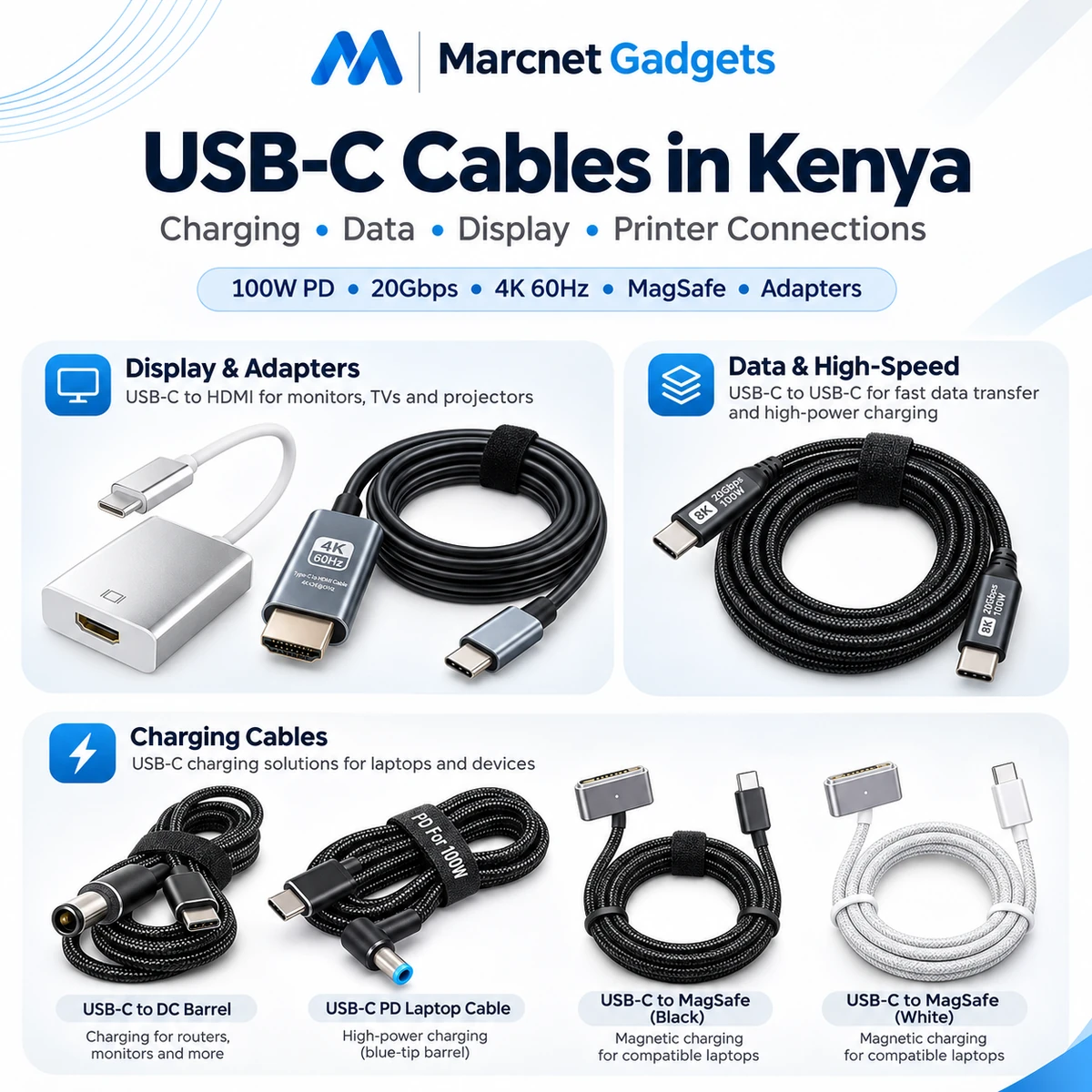
USB-C cables in Kenya do more than charge phones. Depending on the cable, adapter and device, a USB-C connection may carry power, transfer files, connect a laptop to an external screen, operate a printer or provide ports through a hub. The USB-C connector shape alone does not guarantee those functions.
If you are deciding which cable to buy, first identify what you need to connect, then check the connector at both ends, the supported charging power, required data speed and whether your computer’s USB-C port provides video output. This guide uses real products from USB Type-C Devices & Accessories at Marcnet Gadgets to explain the differences and help buyers in Nairobi and elsewhere in Kenya avoid incompatible purchases.
Quick answer: Which USB-C cable do you need?
| Your goal | Look for | Check before purchasing |
|---|---|---|
| Charge a USB-C phone or tablet | USB-C charging cable | Device port, charger type, cable rating |
| Charge a laptop with a non-USB-C port | USB-C PD to a specific charging connector | Laptop connector, voltage/power, PD profiles |
| Connect a USB-C laptop to HDMI TV | USB-C-to-HDMI cable or adapter | Video-capable USB-C port; 4K 30Hz vs 60Hz |
| Connect USB-C to DisplayPort monitor | USB-C-to-DisplayPort cable | DisplayPort Alt Mode and monitor capabilities |
| Transfer files from external HDD | USB-C-to-USB 3.0 Micro-B or SATA adapter | External enclosure socket vs bare SATA drive |
| Connect USB-B printer or compatible DJ device | USB-C-to-USB-B data cable | Device USB-B port, software and power requirements |
| Add laptop ports | USB-C hub | HDMI, USB data, PD passthrough; port features |
| Extend a USB-C cable | Rated male-to-female extension or coupler | Total cable length and supported functions |
For direct shopping, start with Type-C Charging Cables, Type-C Converters & Hubs and Type-C to HDMI Adapters. The sections below explain when each solution is appropriate.
1. USB-C is a connector, not one universal performance specification
USB Type-C is a small, reversible connector found on many laptops, phones, tablets, monitors and accessories. Two cables can look almost identical and behave differently: one might be designed for basic charging, another for high-speed file transfers, and another for a supported high-resolution display connection. Some support a combination of these functions.
Three independent questions matter:
- Power: What USB Power Delivery (PD) level does the cable support, and can the charger negotiate the voltage and power your device needs?
- Data: Does the specific cable and host support the speed you need, such as USB 2.0, 5Gbps, 10Gbps or 20Gbps?
- Video: Does the source USB-C port support DisplayPort Alt Mode or another compatible video-output capability, and can the cable/adapter and monitor handle the desired resolution and refresh rate?
A printed 100W marking on a cable does not make a 30W charger output 100W. Similarly, a cable labelled 8K does not create video output on a charge-only USB-C port. Think of the entire connection as one system: source device + port + cable/adapter + destination device.
2. USB-C charging cables for phones, tablets and USB-C devices
For an everyday USB-C device, the simplest option is a USB-C-to-USB-C cable paired with a compatible charger. Marcnet lists a USB-C to USB-C Charging Cable 2m — White for general USB-C charging applications. Check its product specifications for the intended device rather than assuming it has the same data and display capabilities as higher-specification cables.
For an iPhone or another compatible device with a Lightning port, choose a cable with the correct device-end connector. Marcnet also lists a USB-C to Lightning Charging Cable 1.8m. This is different from a USB-C-to-USB-C cable; check your phone’s actual socket before ordering.
Practical buying check: Know whether your charger has a USB-C output or the older USB-A output. A cable with a USB-C plug at the power-source end will not plug directly into USB-A without a compatible adapter.
3. USB-C PD laptop charging: HP, Lenovo, Surface and DC barrel connectors
Many laptops use dedicated DC or magnetic charging ports rather than USB-C for direct charging. A suitable USB-C PD-to-laptop conversion cable can be useful when you already own a compatible USB-C PD charger or power bank. However, matching the tip is only the first step; voltage, available wattage and charger negotiation still matter.
| Laptop connection | Marcnet product | Important check |
|---|---|---|
| HP round blue-tip | HP USB-C PD to Blue Tip Laptop Charging Cable 100W | Correct HP blue-tip style; adequate PD source; 100W is a cable marking |
| Lenovo rectangular Slim Tip | USB-C PD to Lenovo Slim Tip 65W Charging Cable 1.5m | 11.0×4.5mm Slim Tip; suitable PD source; up to 65W only in compatible setup |
| Microsoft Surface Connect | USB-C to Surface Pro 5 Charging Cable | Compatible Surface model, Surface Connect connector and PD charging profile |
| DC barrel 5.5×2.5mm | USB-C PD to DC 5.5×2.5mm Laptop Charging Cable — 100W | Exact barrel size, required voltage, polarity and adequate PD charger |
The HP blue-tip cable should not be confused with other HP large round-pin types. Likewise, a Lenovo Slim Tip is not interchangeable with a DC barrel jack merely because both are laptop charging connectors.
For barrel-connected equipment, do not guess from connector appearance. A physically fitting DC plug may still be electrically unsuitable. Compare the original adapter’s output details and the laptop or device model; ask Marcnet to check compatibility when these details are uncertain.

4. MacBook charging: MagSafe 1 vs MagSafe 2 vs MagSafe 3
Apple MacBook charging connectors have changed between generations. These three magnetic connector types should be treated as distinct products, not interchangeable versions of one cable.
| Connector | Marcnet option | What to match |
|---|---|---|
| MagSafe 1 L-Tip | USB-C to MagSafe 1 L-Tip Cable 1.8m | Older compatible MacBook with original L-shaped MagSafe port |
| MagSafe 2 T-Tip | USB-C to MagSafe 2 T-Tip Cable 1.8m | Compatible MacBook with the flatter MagSafe 2 interface |
| MagSafe 3 | USB-C to MagSafe 3 Charging Cable 1.8m | Compatible newer MacBook equipped with MagSafe 3 |
All three listed cables are 1.8m. A suitable USB-C PD power source is still required, and compatibility depends on the MacBook model and its charging needs. Confirm your original connector and laptop model before selecting a replacement cable.
Buying tip: A USB-C plug at the charger end does not make the laptop-end MagSafe connectors interchangeable. If in doubt, compare the original connector with Marcnet’s product photos before checkout.
5. USB-C data transfer: portable HDDs, SATA drives and old USB-A ports
If your objective is moving photos, videos, backups or work files, choose based on the storage device’s actual connector.
Portable external HDD with USB 3.0 Micro-B
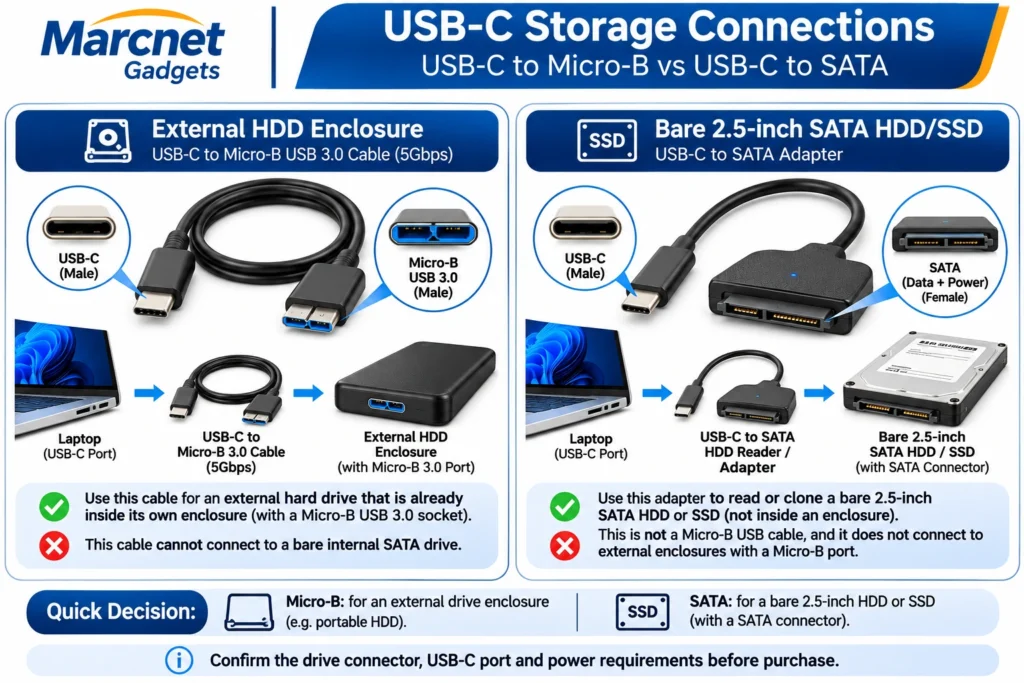
A portable external hard drive may use a wide USB 3.0 Micro-B socket. Marcnet lists a USB-C to Micro-B USB 3.0 HDD Cable — 5Gbps for connecting compatible external drives directly to a USB-C computer. Its listed transfer capability is up to 5Gbps; real-world speed depends on the drive, host port and other equipment. The wide USB 3.0 Micro-B connector is not the same as a narrow legacy Micro-USB connector.
Bare 2.5-inch SATA HDD or SSD
A drive removed from a laptop often has a SATA connector rather than USB 3.0 Micro-B. For that use, Marcnet offers a USB-C to SATA Adapter for 2.5-inch HDD & SSD with a listed USB transfer rate up to 5Gbps. This is for compatible 2.5-inch SATA HDD/SSD devices; do not assume a desktop 3.5-inch hard drive can run from the same adapter without its required external power.
USB-A computer with a USB-C accessory
For a desktop or laptop with an ordinary USB-A host port, the USB 3.0 Type-A Male to USB-C Female Adapter provides a compact USB data connection rated up to 5Gbps with compatible devices. It does not create native USB-C DisplayPort Alt Mode or full USB-C PD support from a basic USB-A port.
Rule of thumb: Micro-B connects to an already enclosed external drive, SATA attaches directly to a compatible internal drive, and USB-A-to-USB-C adapts the computer’s port shape for supported USB connections.
6. USB-C extension cables and female-to-female couplers
A short cable may not reach a desk-mounted display, storage device or docking area. Marcnet lists a USB-C Male to Female Extension Cable 1.5m — 10Gbps, 100W with stated 10Gbps data and 100W PD support for compatible setups. The catalogue also includes a USB-C Female to Female 40Gbps Coupler for appropriate USB-C cabling configurations.
Extension adds another physical connection and more cable length. Do not assume an extension or coupler preserves every capability simply because an advertised maximum speed is high. For demanding display, high-speed data or higher-power use, the host, joined cables, connectors and peripheral must all support the intended function; long or poorly matched combinations can reduce reliability.
See the Type-C Male to Female Extension Cables and Type-C Connectors categories for the current range.
7. USB-C to HDMI and DisplayPort: 4K 30Hz vs 4K 60Hz
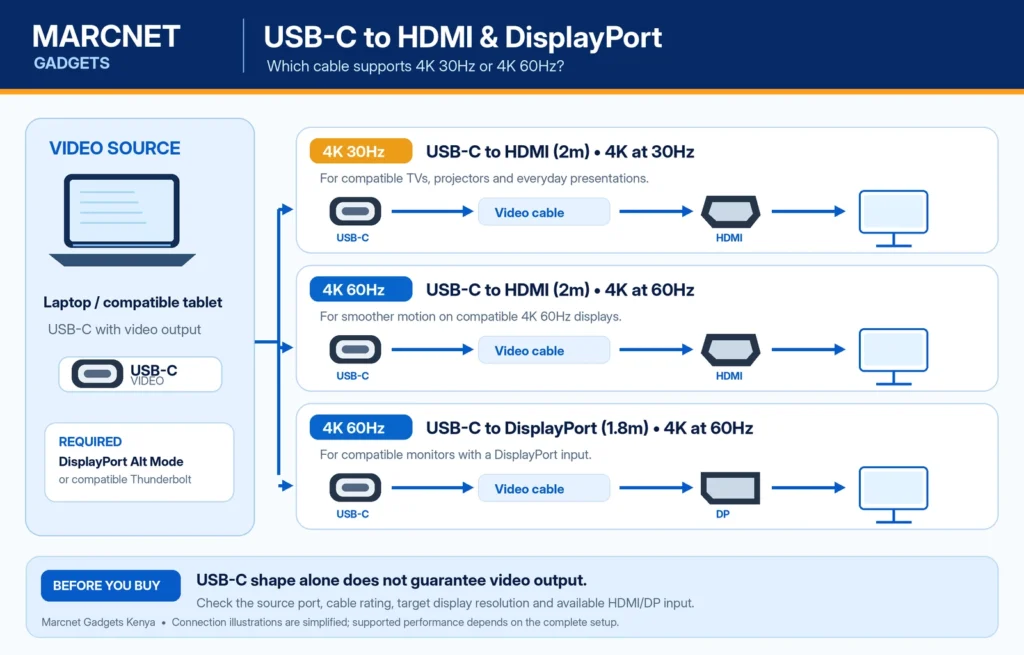
A USB-C-to-HDMI cable or adapter can connect a compatible laptop to a TV, projector or HDMI monitor. A USB-C-to-DisplayPort cable serves displays with DisplayPort input. But a USB-C port used for charging/data only may not output video at all.
Marcnet currently has these distinctly specified options:
| Display connection | Product | Listed maximum |
|---|---|---|
| USB-C to HDMI, 2m | USB-C to HDMI Cable 2m — 4K 30Hz | Up to 4K 30Hz |
| USB-C to HDMI, 2m | USB-C to HDMI Cable 2m — 4K 60Hz | Up to 4K 60Hz |
| USB-C to HDMI female | USB-C to HDMI Female Adapter — 4K 60Hz | Up to 4K 60Hz with suitable HDMI cable |
| USB-C to DisplayPort, 1.8m | USB-C to DisplayPort Cable 1.8m — 4K 60Hz | Up to 4K 60Hz |
What is the difference? At 4K, 60Hz refreshes the picture twice as often as 30Hz. A compatible 4K 60Hz setup can feel smoother for mouse movement, scrolling and motion on a monitor. For static presentations or basic signage, 4K 30Hz may be sufficient where supported.
To achieve the stated maximum, every relevant component must be compatible: the USB-C source port, cable/adapter, available display mode and screen. Check DisplayPort Alt Mode or another supported video-output feature in your laptop specifications. Not every USB-C or USB-A port supports video.
Choose based on the screen: HDMI is common on TVs and projectors; DisplayPort is common on desktop monitors. For a cable with a direct HDMI or DP plug, ensure it matches the display input. For a female HDMI adapter, you will also need a suitable separate HDMI cable.
8. USB-C to USB-C display cables: charging, data and video in one cable
Some USB-C-to-USB-C products are sold with stated support for data, Power Delivery and high-resolution video. Two Marcnet examples are the USB-C to USB-C 1m Display Cable — 20Gbps, 8K, 100W and USB-C to USB-C 3m Display Cable — 20Gbps, 8K@60Hz, 100W.
These are specialised display/data cables, distinct from an ordinary USB-C to USB-C Charging Cable 2m — White. Their stated 20Gbps, 8K and 100W capabilities should be understood as maximum product specifications requiring suitable devices and negotiated operating modes—not features automatically available on every USB-C port. In particular, an 8K-labelled cable does not make a 1080p-only laptop or monitor operate at 8K.
See Type-C to Type-C Display Cables for these specialised options. Before buying, check whether your display actually accepts USB-C video input and whether your source can send compatible video.
9. USB-C hubs: combining HDMI, USB devices and charging
If your laptop has one useful USB-C port but you need a monitor, flash drive and power source, a multiport hub can reduce the number of separate adapters required.
Marcnet’s USB-C 3-in-1 Hub — HDMI, USB 3.0 & PD provides three functions in a compact hub:
- HDMI display output: stated up to 4K at 30Hz, not 4K at 60Hz.
- USB 3.0 Type-A: stated up to 5Gbps data for compatible peripherals.
- USB-C PD input: product-listed pass-through charging support up to 100W with compatible equipment.
A hub cannot add native video output to a host that does not support the requisite USB-C video mode. Power delivery to the laptop may be lower than the PD adapter input rating after hub requirements, so check the complete arrangement.
For more choices, browse Type-C Converters & Hubs. Select a hub by the ports you actually need instead of choosing by the largest number of connectors.
10. Connecting a USB-C computer to USB-B printers and compatible DJ equipment
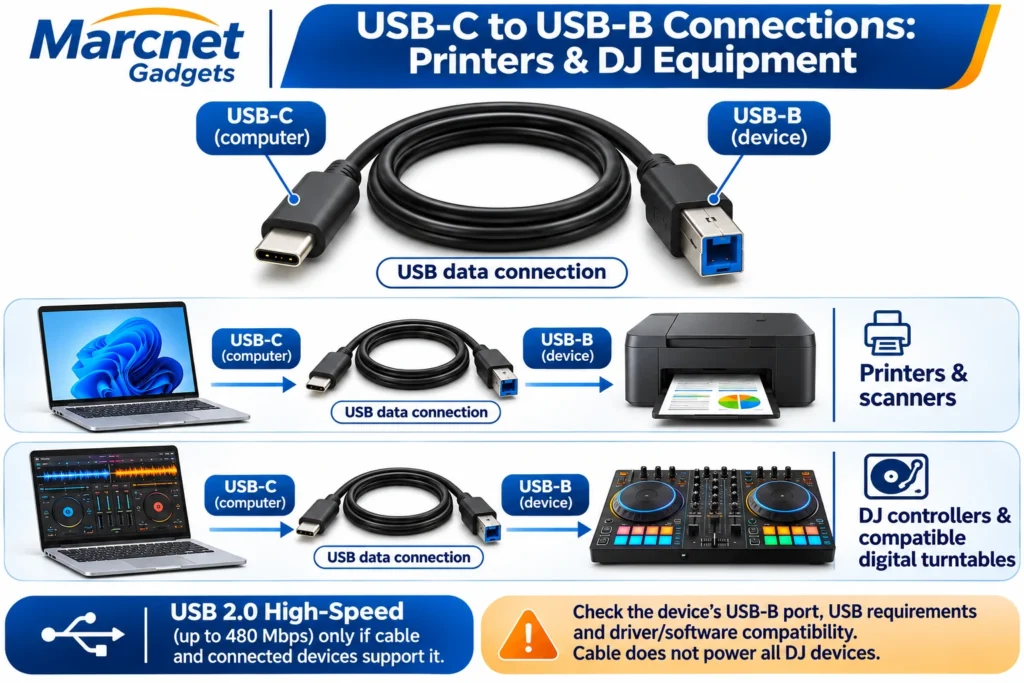
Many desktop printers, scanners and some DJ controllers or digital turntables have a near-square USB Type-B socket for computer data. A computer with USB-C can connect to a compatible USB-B device using a dedicated USB-C-to-USB-B data cable, rather than a USB-C-to-USB-C charging cable.
Marcnet lists the USB-C to USB-B Printer Cable 1.8m for compatible printers and other USB-B peripherals. The listing specifies USB 2.0 High-Speed data transfer up to 480Mbps when supported by the connected devices. This is not a USB 3.0 5Gbps connection; higher USB data rates do not inherently improve digital audio quality.
Printer connection: USB-C computer → USB-C-to-USB-B cable → printer’s USB-B port. Install supported printer software or drivers when required. A network-only printer without USB-B cannot use this connection.
DJ connection: USB-C computer running compatible DJ software → USB-C-to-USB-B cable → DJ controller, mixer or digital turntable with a USB-B computer connection. Depending on the equipment, this link may carry MIDI control or digital audio data; check the manufacturer’s USB implementation, drivers, host compatibility and separate power requirements. The cable does not convert an analog-only turntable into a USB device.
11. USB-C audio adapters: direction and function matter
A customer may need to connect a USB-C audio accessory to a Lightning-equipped device. Marcnet stocks a Lightning Male to USB-C Female Audio Adapter for compatible digital audio applications. It is explicitly listed as an audio-focused adapter. Do not assume it supports charging, general-purpose data, microphones or calling features unless compatibility has been established for the exact equipment.
Adapter direction matters: Lightning male to USB-C female is not the same as USB-C male to Lightning female. Always match which side is the source device and which side is the accessory.
12. Before ordering: five checks that prevent USB-C mistakes
- Photograph both ports. Check the computer/device port and the accessory connector, including DC pin size or the exact MagSafe generation where relevant.
- Identify the job. Charging, video, data transfer, printer/DJ USB data and audio use different capabilities—even when the same USB-C shell appears.
- Check power requirements. Compare the original power adapter’s voltage and wattage with the intended USB-C PD charger and conversion cable. Do not substitute an unverified PD-to-DC cable.
- Confirm the display signal. For HDMI or DisplayPort, check whether the USB-C source supports compatible video output and whether 30Hz or 60Hz matters for your display.
- Match the exact product. Read the Marcnet listing for that product’s cable length, port direction, maximum transfer rate and compatibility notes; avoid transferring a specification from another similarly named item.
If unsure, send Marcnet the laptop/phone/printer model, the two ports you want connected, and the outcome you need (for example, “4K 60Hz external monitor” or “charge Lenovo Slim Tip laptop from USB-C PD”).
13. Frequently asked questions about USB-C cables
Can every USB-C cable charge a laptop?
No. Laptop charging depends on the charger’s negotiated power profile, cable capability and laptop requirements. For non-USB-C laptop charging ports, the correct adapter tip and voltage/power compatibility are also essential.
Does every USB-C port support HDMI or DisplayPort video?
No. Verify video-output support (commonly DisplayPort Alt Mode) in the source computer or phone specifications, along with the specific cable or adapter and screen.
Is a 4K 60Hz USB-C to HDMI cable better than a 4K 30Hz model?
For a compatible 4K screen used for regular computer work and movement, 60Hz generally provides smoother motion. It will work at that refresh rate only when the source, adapter/cable and display all support it.
What is the difference between USB-C to SATA and USB-C to Micro-B HDD cables?
USB-C to SATA connects a compatible bare 2.5-inch SATA HDD or SSD. USB-C to USB 3.0 Micro-B connects to a compatible external drive or enclosure with a wide USB 3.0 Micro-B socket.
Can I use a USB-C to USB-B cable with a printer or DJ controller?
Yes, when the printer or DJ controller has a suitable USB-B computer port, the computer provides a compatible USB-C host connection, and the operating system, driver and application support the device. DJ equipment may need its own power supply, and the USB cable does not provide analog audio conversion.
Is MagSafe 1 the same as MagSafe 2 or MagSafe 3?
No. These are separate magnetic charging interfaces. Match the cable to the original MacBook model and charging connector.
Will a 100W-labelled USB-C charging cable deliver 100W from any charger?
No. Actual charging is limited by the PD charger, cable and connected device. The appropriate power profile must be supported and negotiated.
Can a USB-A to USB-C female adapter provide USB-C video output?
Do not assume so. Marcnet’s listed USB-A-to-USB-C adapter is intended for compatible USB data up to 5Gbps; it does not turn a basic USB-A host into a native USB-C display or full PD connection.
Can I use a Lightning to USB-C audio adapter for charging?
Not without explicit product support. Marcnet describes its Lightning-male-to-USB-C-female adapter as intended for compatible digital audio, and warns against assuming charging or data functionality.
14. Shop USB-C cables and adapters at Marcnet Gadgets Kenya
The correct product is the one that matches your device connector, purpose and confirmed technical requirements—not simply the highest number printed on a listing. For compatible solutions, browse USB Type-C Devices & Accessories, the Type-C Charging Cables range, Type-C to HDMI Adapters, Type-C Converters & Hubs, and Type-C to Type-C Display Cables.
Marcnet Gadgets serves customers in Nairobi and other parts of Kenya. You can review product specifications on the linked pages and contact Marcnet Gadgets with your device model and connection requirements before ordering. Check the live product pages for current availability and pricing, and see the published store returns information for applicable terms.
Leave a Reply