
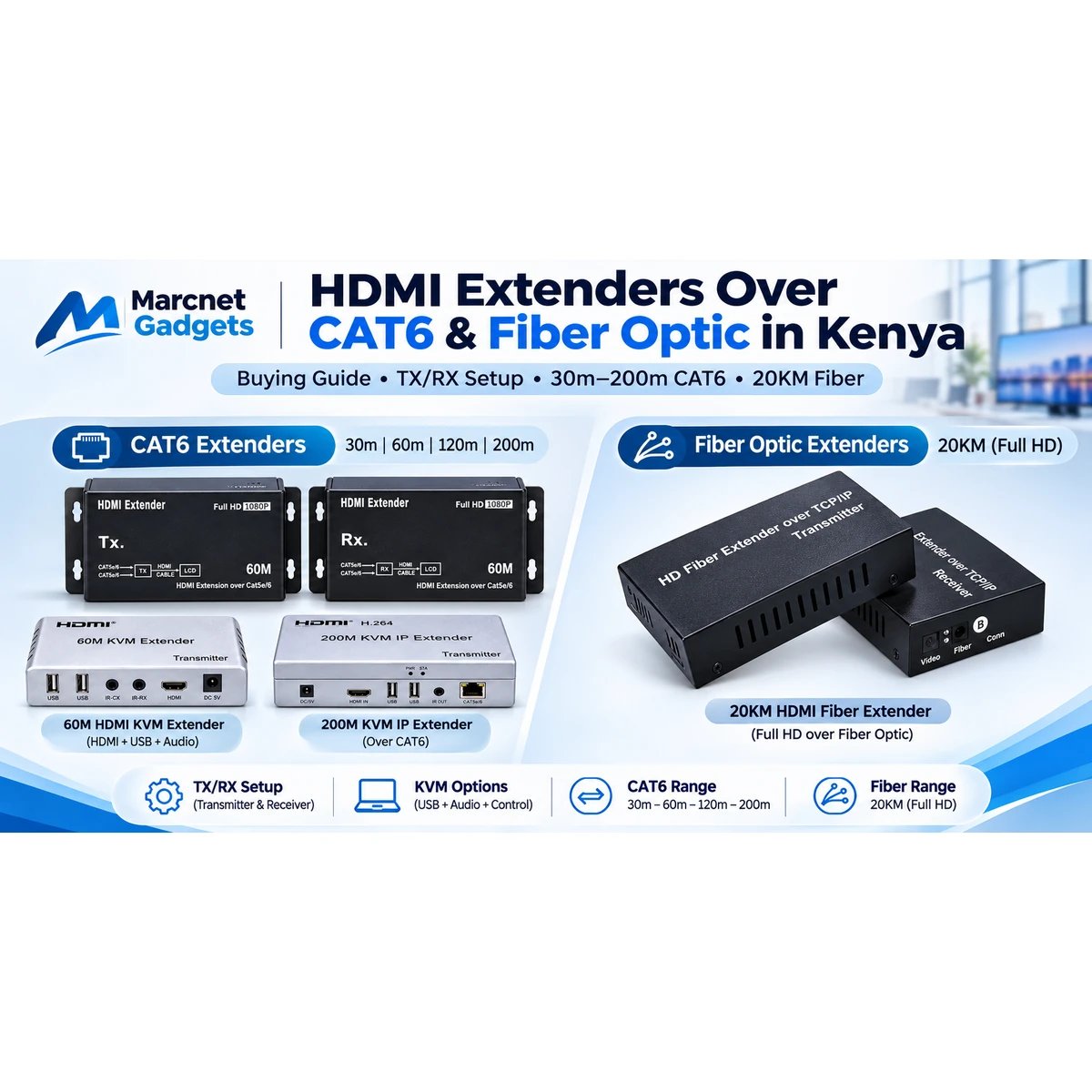
Need to connect a computer, CCTV recorder, decoder or presentation system to a screen far away? An HDMI extender allows a compatible HDMI signal to travel between a transmitter (TX) near the source and a receiver (RX) near the display. Depending on the model, the long-distance link uses CAT5e/CAT6 cable or fiber-optic cable. Some models also extend USB keyboard/mouse control (KVM), audio or infrared (IR) signals.
For shorter installations, Marcnet Gadgets offers CAT6 extender models listed at 30m, 60m, 120m and 200m. For much longer links, Marcnet also lists 20km HDMI fiber-optic extenders supporting Full HD 1080p at 60Hz. The correct choice depends on your cable run, display resolution, control requirements and cable infrastructure—not distance alone.
Browse HDMI Extenders Over CAT6 or HDMI Fiber Optic Extenders at Marcnet Gadgets Kenya.
What Is an HDMI Extender and How Does It Work?
A conventional HDMI cable directly links a source, such as a PC or DVR, to a TV, monitor or projector. When the equipment is in different rooms, buildings or facilities, a suitable extender can replace the long HDMI cable run with another transmission medium.
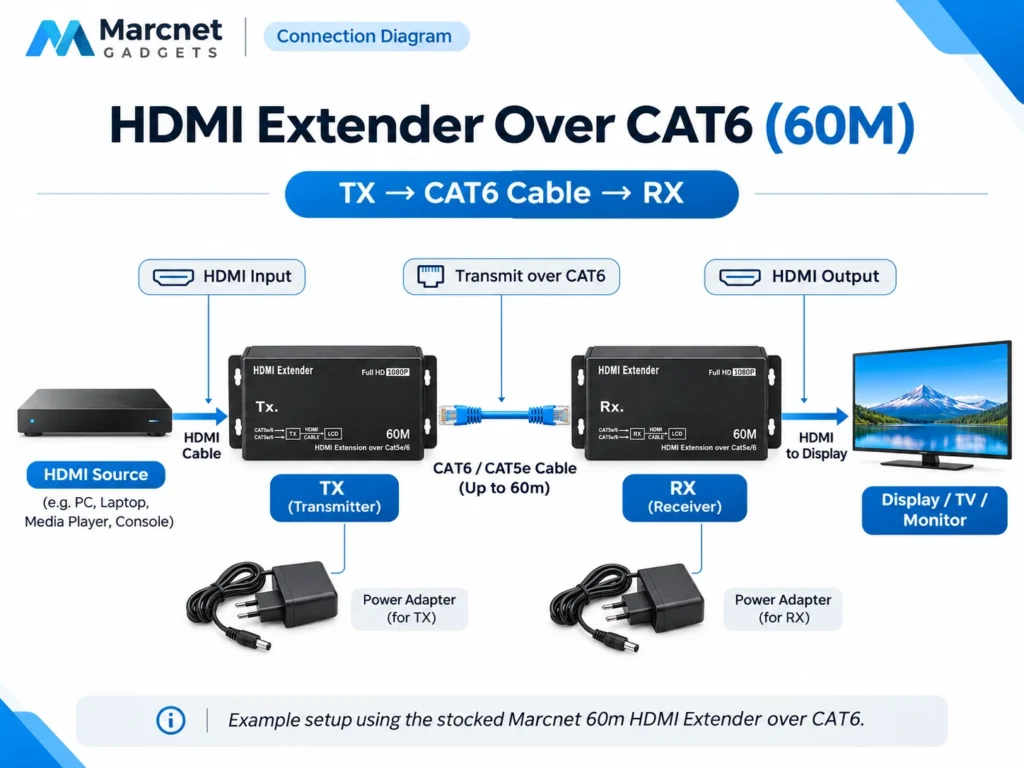
In a typical point-to-point CAT6 setup, the HDMI source connects to TX, a suitable CAT5e/CAT6 cable runs to RX, and the receiver connects by HDMI to the display. For fiber equipment, the connection is similar, but the long-distance link uses a fiber-optic cable compatible with the extender’s optical interfaces.
For a comparison of different HDMI distribution functions, read our HDMI Splitter vs HDMI Switch vs HDMI Matrix guide. A splitter duplicates a signal, whereas an extender carries it over distance.
Key distinction: a CAT6 HDMI extender’s RJ45 socket does not automatically mean that it is an ordinary Ethernet device. Do not connect a point-to-point extender through a router or conventional network switch unless that exact system supports the topology.
HDMI Over CAT6 vs Fiber Optic: Which Should You Choose?
| Feature | HDMI extender over CAT5e/CAT6 | HDMI fiber-optic extender |
|---|---|---|
| Long-distance link | Compatible copper network cable | Compatible fiber-optic cable |
| Marcnet-listed ranges | 30m, 60m, 120m and 200m | Up to 20km |
| Typical use | Rooms, offices, classrooms, CCTV and nearby buildings | Large campuses, multi-building facilities and long-distance control rooms |
| Video support | Varies by model; some are 1080p and one is labelled 4K | Both listed 20km models specify 1080p/60Hz |
| Remote keyboard/mouse | Available on selected KVM models | Available on the 20km fiber KVM model |
| Installation checks | Cable grade, termination, power and model topology | Fiber type, optical connectors, link budget, power and topology |
A 20km rating is a maximum stated range, not a promise that every fiber cable or installation will work at that distance. Likewise, 200m CAT6 is a specific extender rating; it must not be confused with the ordinary Ethernet channel length commonly used in network design.
Marcnet Gadgets CAT6 HDMI Extenders: Five Models Compared
Marcnet’s CAT6 range includes basic video extenders as well as KVM systems for remote control of compatible computers or DVR/NVR equipment.
1. 30M Non-Powered HDMI Extender Over CAT6
The 30M Non-Powered HDMI Extender Over CAT6 is the simplest option in this selection. It uses a matched HDMI-to-RJ45 TX/RX pair and one compatible CAT5e/CAT6 cable between the units. Its primary stated use is 1080p over distances up to 30 metres, and it does not require separate external power adapters.
The packaging also mentions 4K/2K compatibility, but 4K at the full 30m distance is not verified. Choose this model for a straightforward, compatible Full HD connection rather than an installation that specifically requires proven 4K performance at maximum distance.
Consider it for: a projector in a small meeting room, a remote TV, or a basic CCTV monitoring display.
2. 60M HDMI Extender Over CAT6 — Full HD 1080P
The 60M HDMI Extender Over CAT6 — Full HD 1080P TX/RX extends compatible HDMI video over CAT5e/CAT6 cabling up to its stated 60m range. It uses separate transmitter and receiver units and powered operation; the live product description lists DC 5V/1A in the supplied documentation.
This is a practical choice when you need a Full HD display farther from the HDMI source but do not require remote USB keyboard/mouse control.
Consider it for: CCTV monitoring, training rooms, office displays, digital signage and projectors.
3. 60M HDMI KVM Extender Over CAT6 with USB & Audio
The 60M HDMI KVM Extender Over CAT6 with USB & Audio adds USB/KVM and audio functionality to the stated 60m HDMI extension. A compatible keyboard and mouse can be used at the remote receiver location while the source computer or recorder remains elsewhere.
Its exact maximum video format, USB standard and supported audio formats are not established by the product photographs. Verify these details against the manual if they matter to your installation.
Consider it for: control rooms, server rooms and remote CCTV recorder operation.
4. 4K 120M KVM HDMI, Audio & USB Extender Over CAT6
The 4K 120M KVM HDMI, Audio & USB Extender is marked 4K and 120M on the units and packaging. It provides HDMI extension with USB/KVM functionality through a powered TX/RX arrangement.
Important: the listing does not establish a specific 4K refresh rate. Do not assume 4K at 60Hz, or even 4K at the entire 120m distance, without confirmation of the intended source mode and the product’s documentation.
Consider it for: longer office, classroom, security and remote workstation installations needing KVM control where video-format compatibility has been checked.
5. 200M HDMI KVM IP Extender Over CAT6 — HDMI & USB TX/RX
The 200M HDMI KVM IP Extender Over CAT6 is marked H.264 200M KVM IP Extender. Its listing identifies an up-to-200m range, USB/KVM functionality, RJ45 transmission and powered TX/RX units.
The H.264 marking is documented, but the listing does not confirm exact video resolution, frame rate, latency, HDCP behaviour or which network-switch arrangements are supported. For interactive use, where responsiveness is important, check the manufacturer documentation and test the planned installation before deployment.
Consider it for: widely separated CCTV, PC or professional AV locations requiring remote operator controls.
20KM HDMI Fiber Optic Extenders in Kenya
When the distance is measured in kilometres rather than metres, a compatible HDMI fiber extender can transport an HDMI signal over an appropriately installed optical-fiber link. Marcnet Gadgets currently lists two 20km Full HD models.
6. 20KM HDMI Fiber Extender Over TCP/IP — 1080P 60Hz
The 20KM HDMI Fiber Extender Over TCP/IP 1080P 60Hz is designed to send HDMI video and audio over a compatible fiber-optic connection. Its listed maximum video format is 1920 × 1080 at 60Hz, with a stated transmission range of up to 20km.
The product listing describes both a direct TX-to-RX fiber connection and a possible one-to-many arrangement using a compatible fiber Ethernet switch. That does not establish universal compatibility with any existing network switch, SFP module or fiber infrastructure. Confirm the actual equipment combination before designing a multi-receiver installation.
Consider it for: campus AV links, long-distance CCTV monitoring, industrial sites, commercial premises and remote Full HD screens.
7. 20KM HDMI KVM Fiber Extender — USB, Audio & IR
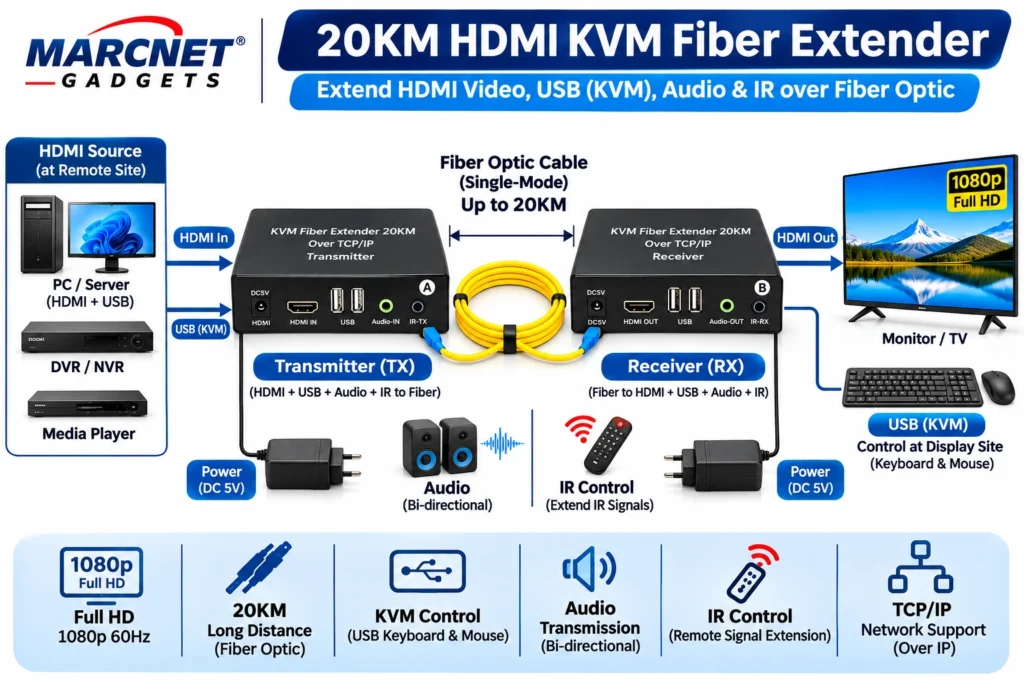
The 20KM HDMI KVM Fiber Extender 1080P 60Hz with USB, Audio & IR combines a stated up-to-20km fiber link with 1080p/60Hz HDMI, USB/KVM, separate audio and IR extension. It is the more suitable of the two fiber models when operators also need compatible remote keyboard/mouse control.
For either 20km model, verify the optical connector, supported fiber type, included optical hardware, the number of fiber strands required and the power arrangements before purchase. Neither model should be presented as a 4K extender.
Consider it for: remote security/control rooms, server operations and facilities where the operator is a long distance from the equipment.
HDMI Extender vs HDMI KVM Extender: What Is the Difference?
A basic HDMI extender is primarily intended to carry compatible video—and often HDMI-embedded audio—to a remote display. A KVM extender is designed for situations where you must also operate the source equipment from that remote location.
For example, a security recorder may remain inside a locked equipment room while an operator uses a monitor, keyboard and mouse at a reception or security desk. A compatible HDMI KVM kit provides the required video and USB-control path. Confirm which USB devices and functions the selected model supports; USB ports alone do not guarantee compatibility with every peripheral.
How to Connect an HDMI Extender Over CAT6
- Measure the route. Measure the actual installed cable length, including wall routes, conduits and service loops—not only the straight-line distance.
- Check source and screen. Confirm HDMI ports, the video resolution and refresh rate, and any HDCP requirements.
- Choose the right model. Decide whether you need video only or HDMI plus USB/KVM and audio.
- Place the TX beside the source. Connect the computer, decoder or DVR/NVR HDMI output to the transmitter’s HDMI input.
- Connect TX to RX. Run the correct supported CAT5e/CAT6 cable and terminate it as required by the model. The 30m non-powered unit calls for a single cable and recommends T568B termination.
- Connect the receiver. Connect RX HDMI output to the TV, monitor or projector. On a KVM model, connect the required USB/control equipment as instructed.
- Connect power where needed. The 30m model is listed as non-powered; the 60m, 120m and 200m systems have model-specific powered requirements.
- Test before concealing cables. Verify stable picture, sound, remote controls and the intended display mode over the full installed route.
Diagram 1 placement: HDMI Source → CAT6 Transmitter (TX) → Compatible CAT6 Cable → Receiver (RX) → HDMI Display. Show optional USB control only for KVM-equipped models.
How to Connect a 20KM HDMI Fiber Optic Extender
- Identify the source HDMI device and destination display or remote control workstation.
- Check that the actual TX and RX are a compatible pair and that their optical connectors, fiber type and link requirements match your cable infrastructure.
- Install TX near the HDMI source and connect the source HDMI output.
- Connect the compatible fiber-optic link between TX and RX, following the manufacturer’s fiber routing and handling instructions.
- Place RX near the remote display, connect HDMI and, on the KVM model, the supported USB, audio or IR connections.
- Connect the required power supplies and test Full HD 1080p/60Hz operation with the actual source and display.
- For an intended one-to-many fiber distribution system, verify the exact compatible switching equipment and additional receivers before installing them.
Diagram 2 placement: HDMI Source → 20KM Fiber TX → Compatible Fiber Optic Cable (up to stated 20km) → Fiber RX → HDMI Display. For the KVM variant, add supported USB keyboard/mouse connections at the operator end.
HDMI Extender Installation Examples in Kenya
CCTV monitoring and security: Position the DVR/NVR in a protected room and place a monitoring display at reception or in a security office. Choose a KVM version if operators need keyboard/mouse access to the compatible recorder.
Churches and event venues: Use compatible HDMI extenders to connect presentation computers and video sources to screens or projectors positioned far from the control point. Check the required video format and latency before using the system in a live-production workflow.
Schools and training centres: A 30m or 60m CAT6 model may suit a projector or remote display, subject to the actual cable run and equipment.
Offices and meeting rooms: Use an extender to keep source equipment in a cabinet while displaying video in a boardroom or presentation space. For remote PC operation, compare the KVM models.
Large campuses and industrial sites: Where an optical-fiber route is available and distances exceed typical copper extender ranges, a 20km 1080p fiber TX/RX system may be more appropriate.
Common HDMI Extender Problems and Troubleshooting
No picture on the remote screen
Check that TX and RX are not reversed, all units needing external power are powered, the HDMI source is outputting a compatible signal and the screen is on the correct input. Inspect cable connections and test with a shorter known-good link where practical.
Picture flickering or dropping out
Check the actual cable run, cable condition, terminations and interference exposure. If the source is set to a video mode that has not been confirmed for the extender, test a verified supported mode such as 1080p on the relevant models.
The USB keyboard or mouse does not respond
First verify that you selected an HDMI KVM extender, not a video-only kit. Check the required source-side USB connection, receiver-side ports and permitted peripheral types in the manual.
Audio or protected video is missing
Confirm the source’s audio output mode and the system’s supported formats and HDCP compatibility. Do not assume every extender passes all protected-content formats or advanced audio modes.
A fiber extender does not connect
Verify optical connector type, cable type, required strand arrangement, optical modules, cable continuity and power. A 20km maximum range label does not resolve interface incompatibility or damaged fiber.
Before Buying: A Six-Point Checklist
- Distance: What is the real installed cable length?
- Resolution: Is Full HD 1080p enough, or is a specific 4K mode essential?
- Controls: Do you need only an image, or keyboard/mouse KVM, audio or IR too?
- Infrastructure: Will you use CAT5e/CAT6 or a compatible optical-fiber link?
- Topology: Is it a direct point-to-point connection or a model-approved distribution system?
- Verification: Have you checked the source, display, accessories, power and manufacturer instructions?
If you are unsure, share the source device, display model, measured distance, target resolution, available cable type and USB/KVM needs with Marcnet Gadgets before ordering.
Frequently Asked Questions
Can I use CAT6 cable instead of a long HDMI cable?
Yes, with a compatible HDMI extender TX/RX kit. The CAT6 cable connects the extender units; it does not connect directly into an ordinary HDMI port.
Is a 60m HDMI extender the same as a 60m KVM extender?
No. Marcnet lists a 60m Full HD HDMI extender for video transmission and a separate 60m HDMI KVM extender that adds USB/KVM and audio features. Choose according to whether remote control is required.
Does the Marcnet 120m HDMI KVM extender support 4K at 60Hz?
The model is labelled 4K, but the live listing does not establish a specific 4K refresh rate. Check the exact 4K mode and maximum compatible distance before purchasing it for a 4K60 installation.
Can I connect an HDMI extender to a normal router?
Not automatically. Some systems use RJ45 solely for their own TX/RX signal. Use a network switch or router only when the specific extender documentation confirms that topology. The 20km fiber over TCP/IP model lists a compatible one-to-many fiber-switch option, subject to equipment matching.
Does a 20km HDMI fiber extender transmit 4K?
The two 20km models currently linked by Marcnet specify Full HD 1920 × 1080 at 60Hz. They should not be described as 4K models.
What is the difference between an HDMI fiber extender and a fiber-optic HDMI cable?
A fiber extender usually has separate TX and RX units connected by compatible fiber cabling. An active optical HDMI cable is a preassembled cable with HDMI connectors. Their connectors, installation requirements and upgrade options differ.
Which extender is suitable for remote CCTV control?
A compatible HDMI KVM extender is appropriate when you need to view the CCTV recorder’s output and operate it remotely with supported controls. The required distance, video mode and USB interface determine which model to choose.
Shop HDMI Extenders at Marcnet Gadgets Kenya
Explore the full HDMI Extenders Over CAT6 selection for 30m–200m listed ranges, or compare HDMI Fiber Optic Extenders for long-distance Full HD links up to the stated 20km rating.
Need compatibility advice? Contact Marcnet Gadgets with the source, destination screen, planned cable length and connection requirements so the correct TX/RX arrangement can be checked before purchase. Marcnet serves customers in Nairobi and across Kenya.
Leave a Reply